Let's start with the truth, because it changes everything: no mobile app performs pregnancy tests. Pregnancy is confirmed by a home pregnancy test or a beta-hCG blood test, because both detect the hCG hormone—and no questionnaire, camera, or algorithm can measure this hormone. What is available in official stores, and what this guide teaches you how to install, are... menstrual cycle and symptom tracking appsThey record dates, organize information, and make estimates. If you suspect you are pregnant, see a doctor.
Having issued that warning, the guide remains valid. Below you will see which cycling apps are best rated in official stores, a step-by-step guide to downloading and installing them from the Play Store and the App Store, how to configure the app on first use to get decent predictions, and — importantly — how to avoid scams surrounding this topic.
How do menstrual cycle apps work?
Every app in this category works based on what you type. You enter the first day of your last period and the average length of your cycle; the app then projects the next date and the likely fertile window. As you log more months, the projection gets closer to your actual pattern.
Some also allow you to record basal body temperature, flow, mood, cramps, and results from ovulation tests purchased at the pharmacy. In all cases, the same rule applies: the app organizes data that comes from outside, It doesn't measure anything on its own. A delay recorded on the calendar is a sign that you should take a physical test—it's not a result.
- What you get: Cycle history, late payment alert with exact day count, birth control reminder, symptoms organized to take to the doctor's office.
- What no app delivers: Hormone detection, pregnancy confirmation, diagnosis, replacement for pharmacy tests, blood tests or consultations.
The best apps to download
Flo — Calendário Menstrual
O Flo It's the most popular in its category and a good starting point for those who have never used it. The initial registration asks a few questions about your cycle, and from there the main screen shows how many days your period is expected. When the cycle goes past the expected date, the app notifies you of the delay — and that's the only information it provides.
It has a free version that's complete enough for daily use and a large library of content on reproductive health. Download on Google Play.
Clue — Calendário Menstrual
O Clue It has a simple design and focuses on data. It clearly shows the variation in your cycle month by month, which is especially useful for those with irregular cycles who need to take this history to their gynecologist.
It's free, with an optional subscription for advanced features. Download on Google Play.
Clover — Calendário Menstrual
O Clover It's lightweight and straightforward, a good option for simpler phones or for those who don't want complicated registration. It tracks menstruation days, calculates the average cycle length, and sends reminders, without excessive screen time.
It works well offline and takes up little space. Download on Google Play.
Premom — Ovulação e Fertilidade
O Premom It's designed for those trying to conceive. It allows you to photograph ovulation test strips and track the intensity of the line over the days, creating a trend graph.
It's worth reinforcing the principle: the data comes from the physical pharmacy test; the app only stores and organizes it. Download on Google Play.
Ovia Fertility
O Ovia Fertility It tracks basal body temperature, cervical mucus, and ovulation test results. It's more detailed than average and appeals to those already undergoing fertility treatment who want a meticulous record to show in their doctor's office.
Gravidez+ — semana a semana
This is for after confirmation. The Pregnancy+ It tracks development week by week, keeps track of appointment dates, and helps organize prenatal questions.
Download on Google Play. See also our selection of pregnancy apps and the list of apps to track cycle and symptoms.
How to download and install from Google Play (Android)
- Open the Google Play on your mobile phone (the colorful triangle-shaped icon).
- Tap the search bar and type the exact name of the app, for example, "Flo Menstrual Calendar".
- Check out the developer Right below the name, on the app's page. There are many copies with similar names and a similar icon.
- Scroll down to “Data Security” and read what the app collects before installing. Cycle data is sensitive data.
- Tap on Install and wait for the download to finish.
- Open the app and complete the initial registration: date of your last period and average cycle length. Without this information, the prediction will be inaccurate.
How to download and install from the App Store (iPhone)
- Open the App Store and tap the magnifying glass in the bottom right corner.
- Enter the app name and check the developer in the listing.
- See the "App Privacy" section, which lists what is collected and linked to your identity.
- Tap on To obtain and confirm with Face ID, Touch ID, or your Apple ID password.
- When opening the app, allow notifications only if you want reminders; denying them won't affect functionality.
- Complete the initial setup using the dates from your last cycle.
Initial setup: how to get the app working correctly
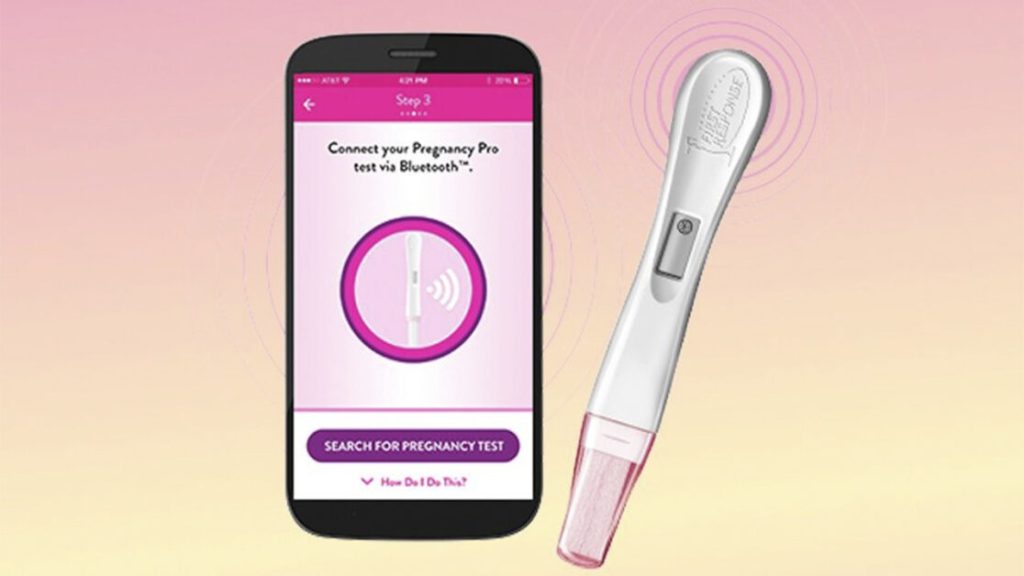
Most complaints about "the app got my date wrong" stem from incorrect configuration. Since the prediction is purely statistical, it depends entirely on the accuracy of the information you provided initially. Three adjustments resolve almost all issues.
The first one is correct date of last menstrual period — the first day of bleeding, not the day it stopped. Many people record this incorrectly right at the beginning and carry this discrepancy for months. The second is the average cycle durationIf you're unsure, leave the default at 28 days and adjust it after two or three months of recording, once the app has calculated your actual average.
The third one is the habit of marking every month. An app with three recorded cycles provides much better predictions than one with only one. Activate the daily reminder for the first few months; after that, it becomes unnecessary. And remember that irregular cycles—common in adolescence, pre-menopause, and conditions like polycystic ovary syndrome—reduce the accuracy of any prediction. In this case, the app's value lies in the history you provide to your gynecologist, not in the date it projects.
Privacy: cycling data is sensitive data.
Under the General Data Protection Law, health information receives enhanced protection. In practice, this means that you should choose an app based on what it does with your data history, and not just on its attractive interface.
Before installing, read the "Data security" section on Google Play or "App privacy" on the App Store: both explain what data is collected and whether it is shared with third parties. After installing, go to the settings and enable password or biometric locking within the app itself—this way, whoever picks up your unlocked phone won't see your history. If there is an option to uncheck data sharing for advertising, uncheck it.
Finally, it's best to create an account using email instead of a social media account, and save an export of your browsing history if the app allows it. If you decide to switch apps, delete your account through the settings before uninstalling.
Never install via APK or website link.
This deserves a paragraph of its own because it's the most costly mistake. Websites that offer "the full unlocked version" as a file to download directly to your phone are the main entry point for malicious programs on Android. A health app installed this way can request permissions that don't make sense, display ads outside the app, steal banking credentials, or simply charge a subscription without delivering anything.
If any website asks you to enable "unknown sources," "install from unknown sources," or download a file ending in .apk, close the page. All the apps mentioned here are available for free on Google Play and the App Store.
Common scams involving "cell phone pregnancy tests"“
- An app that promises results on screen. There is no such thing as a pregnancy test via questionnaire. The goal is usually to display advertisements or sell subscriptions.
- Free trial that turns into a charge. "3-day free trial" periods that automatically renew at high prices. Check the price on the store's listing and cancel through your Google Play or Apple account.
- Excessive data request. A cycling app doesn't require a CPF (Brazilian tax ID), contacts, photo ID, or access to WhatsApp.
- Profiles that offer exams via PIX. “"Social media clinics" that ask for upfront payment to schedule exams are known scams. Contact the healthcare facility directly.
- Copies with similar names. Always check the developer and the number of downloads before installing.
How to confirm a real pregnancy
- Pharmacy test. It detects hCG in urine, is inexpensive, and is sold without a prescription. It tends to be more accurate from the first day of a missed period onward, using the first urine of the day.
- Beta-hCG blood test. More sensitive, it detects the hormone earlier and indicates its quantity. It can be requested through the public healthcare system.
- Medical consultation and ultrasound. It is the professional who confirms and estimates the gestational age and initiates prenatal care.
In Brazil, initial care takes place at the nearest Basic Health Unit, and prenatal care through the SUS (Unified Health System) is free. Official information is available on the portal of [website name - likely OCR error]. Ministry of Health.
Common questions
Do I need to pay to use these apps? No. They all have a functional free version; the subscription is optional and the price appears on the store's page.
Does the app work without internet? Cycle logging works offline on most of them. Synchronization and article content require an internet connection.
Can I use it on more than one phone? Yes, as long as you log in with the same account. Prefer logging in via email instead of a social network.
How do I delete my data? Delete the account through the app's own settings before uninstalling. Simply uninstalling does not erase what remains on the server.
Can the app be used as a contraceptive method? No. The fertile window is an estimate and does not protect against pregnancy or sexually transmitted infections.
Conclusion
Downloading a good menstrual cycle app takes less than two minutes and solves a real problem: stopping relying on memory to know when your period started, how many days late you are, and what symptoms appeared in each phase. Flo, Clue, Clover, Premom, Ovia, and Pregnancy+ are available in official app stores and do this job well.
None of them confirm a pregnancy—that's the job of a home pregnancy test, a blood test, and a doctor. Install it from Google Play or the App Store, never from a file downloaded from a website, and use the app for what it does best: organization.