Ah, the sleep! This crucial part of our health and well-being. With growing awareness about the importance of a good night's sleep, many people are turning to applications to help monitor and improve sleep quality.
In this article, we present the five best apps for tracking your sleep and offer a detailed analysis of each one. So, let's go!
Sleep Cycle
Firstly, we have the Sleep Cycle. This amazing app is widely known and used by people who want to monitor and analyze their sleeping patterns.
It tracks your movements and sounds throughout the night, using your phone's microphone and accelerometer to provide detailed information about your sleep quality.
Additionally, Sleep Cycle has a smart alarm feature that attempts to wake you up at the ideal time within your sleep cycle, preventing you from waking up in the middle of a deep sleep stage.
Available to: Android It is iOS
SleepScore
Next we have SleepScore. This fantastic app uses your smartphone's microphone and sensors to track your sleep quality and provide a sleep score. This score offers a measure of your sleep efficiency, helping you identify areas that need improvement.
The app also provides personalized tips to help you improve your sleep routine and optimize the quality of your rest.
Available to: Android It is iOS
Sleep as Android
Now, we present Sleep as Android, an app specifically for Android devices that offers a wide range of features to monitor and improve the quality of your sleep. It records movements and sounds during the night, using your cell phone's accelerometer and microphone.
With features such as smart alarm, snoring recording and integration with wearable devices, Sleep as Android is an excellent option for those looking to improve their sleep.
Available to: Android
ShutEye
Fourth, we have ShutEye, a comprehensive sleep tracking app that offers multiple features to help improve your sleep quality. It uses your smartphone's microphone and sensors to analyze your sleep quality, providing detailed information about sleep cycles, duration and efficiency.
In addition to tracking sleep, ShutEye offers additional features like a library of relaxing sounds and bedtime stories that can help calm the mind and make it easier to fall asleep. The app also has guided meditations aimed at improving sleep and relaxation.
Based on the data collected, ShutEye provides personalized tips and recommendations to help improve your sleep quality. Additionally, it allows you to set reminders to maintain a regular sleep routine and smart alarms that try to wake you up at the ideal time within your sleep cycle.
Available to: Android It is iOS
Pzizz
Last but not least, we have Pzizz. This unique app not only tracks sleep, but also helps you fall asleep faster through a combination of music, sound effects, and voiceovers designed to calm the mind. It has an adjustable sleep timer and can also be used for short naps during the day.
With Pzizz, you can improve not only the quantity but also the quality of your sleep.
Available to: Android It is iOS
Conclusion
And there it is! These are the five best apps to track your sleep. Each app offers unique features and is available on different platforms, ensuring you find the perfect option for your needs.
Keep in mind that while these apps can provide valuable information about your sleep, they are not a substitute for medical advice. If you are experiencing severe sleep problems, it is important to consult a healthcare professional for proper guidance and treatment if necessary.
What to look for before installing
- Export for the doctor. A report in PDF or spreadsheet format makes the consultation much more productive.
- What the app actually does. Recording information is different from measuring. Health apps organize data that you or a device provide.
- What happens to your data?. Health data is sensitive. Check if it's being shared with third parties and if it's possible to delete everything.
- Integration with certified device. When there is a real measurement, it comes from equipment with a sanitary registration — the app only receives the number.
The limits: what no app does
Before installing, it's worth managing your expectations: there are things that no app in this category delivers.
- They don't provide diagnoses. No app can replace a professional evaluation.
- The cell phone does not measure blood pressure, glucose, body temperature, nor does it perform imaging tests. There is no sensor for that in the device.
- Estimates of steps, calories, and sleep are approximations based on motion sensors, with a significant margin of error.
- They are not a substitute for prescribed medication or treatment, and should not be used to guide dose changes.
Common questions
Does the app actually measure it?
No. It records what you type or what a certified device sends. The cell phone does not have a sensor for blood pressure, glucose, or medical imaging.
Is there an app that detects disease?
Not reliably. Screening tools may suggest seeking care, but they don't diagnose.
Can I stop taking the medication if my numbers improve?
No. Any change in treatment needs to be decided with the professional who is following the case.
Is step counting reliable?
It's an estimate. It serves to track trends over time, not as an exact measurement.
Is my health data protected?
It depends on the app. Read the privacy policy and check if there is any sharing with advertisers and if it's possible to delete your browsing history.
Step-by-step to get started
- Write down the value along with the time. Date and time transform random numbers into useful historical data for the professional.
- Generate the report before the query. Exporting as a PDF and having it printed or on your phone greatly shortens the conversation.
- Check out the privacy policy. Health data is sensitive data. Check if it is being shared with third parties and if it's possible to delete everything.
- Use certified equipment when taking measurements. The cell phone doesn't measure; the equipment with sanitary registration does the measuring. The app only stores the number.
Traps that catch almost everyone
- Install an app that promises to detect disease through photos, sounds, or questionnaires.
- Swap in-person consultations for apps — none of them provide diagnoses.
- Believing that a cell phone measures blood pressure, glucose, or body temperature is wrong; there is no sensor for that in the device.
- Changing medication dosage based on a number seen in the app.
Before installing: what's already on the device
Android and iPhone already come with a native health app that consolidates steps, sleep, and measurements sent by other devices, with privacy controls by data type. It's usually the safest place to store your history, and you can export it to take to your doctor.
What can a cell phone really measure?
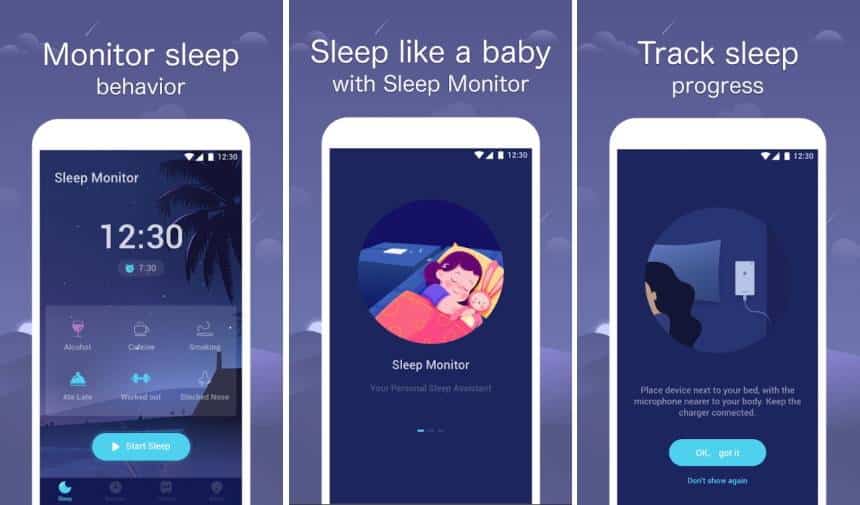
Before interpreting any graph, it's necessary to know where the numbers come from. A sleep app on a cell phone has access to two sensors, and that's it:
- Accelerometer. It records movement. If the device is on the bed, it detects when you turn over.
- Microphone. It captures sound: snoring, breathing, ambient noise.
Based on movement and sound, the program estimates whether you are asleep or awake, and infers sleep stages from patterns of agitation. This technique has a name — actigraphy — and is used in sleep research, with equipment calibrated on the wrist. It gives a reasonable estimate of total sleep time and the time you fell asleep.
What it doesn't do: accurately identify sleep stages. Light, deep, and REM sleep are defined by brain electrical activity, eye movement, and muscle tone—measured by electrodes, not a cell phone on the mattress. A still body can be in deep sleep, REM sleep, or awake and motionless, and no accelerometer distinguishes between the three.
Watches and bracelets add heart rate and heart rate variability, which improves the estimate, but it remains an estimate. The test that classifies sleep stages is polysomnography, performed in a laboratory or with prescribed home equipment.
No app diagnoses sleep apnea.
It's important to be explicit because the marketing for this category suggests otherwise. Obstructive sleep apnea is a medical condition defined by the number of pauses in breathing per hour, measured with airflow sensors, respiratory effort, and blood oxygenation. This doesn't exist in cell phones.
Recording snoring has a real but limited use: to show the doctor that there is loud snoring and, sometimes, periods of silence followed by loud noise. This can motivate the doctor to seek evaluation. It's an indication to prompt a consultation, not a definitive diagnosis.
Signs that justify seeking professional help, regardless of what the app showed:
- Loud and habitual snoring, especially with pauses that are noticeable to the person sleeping next to you.
- Excessive daytime sleepiness, with a risk of falling asleep while driving.
- Waking up with a feeling of suffocation.
- Frequent morning headaches.
- Insomnia that persists for more than three months.
- Abnormal movements or behaviors during sleep.
It's important to reiterate what the device absolutely does not do: the cell phone does not measure blood oxygenation, blood pressure, or glucose. There is no sensor for this in the device. Apps that claim to measure these parameters via the camera or touch screen produce numbers without any physical basis.
Sleep hygiene: what evidence supports it
Apps often suggest habits. Those that appear most supported by recommendations from medical societies are:
- Regular hours, including weekends. It is the single measure with the greatest impact. Sleeping and waking at widely varying times produces an effect similar to jet lag.
- Dark, quiet, and cool environment. Body temperature needs to drop for sleep to begin, and a warm room interferes with that.
- Caffeine with a time limit. The half-life of caffeine in the body is about five to six hours, which means that half of the coffee consumed at 5 pm is still active at 11 pm.
- Alcohol is not a useful sedative. It speeds up the process of falling asleep and fragments the second half of the night.
- Regular exercise helps, preferably not in the hours immediately before bedtime.
- A bed for sleeping. If you don't fall asleep within about 20 minutes, the advice is to get up, do something quiet in low light, and then return when you're sleepy.
- Exposure to natural light in the morning, which is the main synchronizer of the biological clock.
- Do not sleep with the device charging under your pillow. A battery heats up while charging, and covering it prevents heat dissipation.
- The app keeps the sensors active all night., This consumes battery power and requires the phone to remain plugged in.
- Dense foam mattress absorbs movement. and hinders detection; a shared mattress registers the other person's movement.
- Do Not Disturb mode on, Otherwise, the early morning notification will turn into a recorded wake-up call.
- Check if the audio is stored. And for how long. Some apps record parts of the entire night and send them to a server.
- Check if the data is going to the cloud. or they remain in the device.
- Read what the policy says about sharing. with third parties and advertisers. Health data is a sensitive category under the General Data Protection Law, with enhanced protection, and you have the right to request its deletion.
- Review the permissions. A sleep monitor needs a microphone and sensors. It doesn't need contacts, precise location, or access to all photos.
- Be careful with integrations. Connecting the sleep app to health platforms expands who can see the history.
Regarding the blue light from screens: it does influence melatonin production, but the effect of the content—the stimulation of scrolling, replying to messages, and reading news—is often just as significant. Having the night filter on doesn't compensate for two hours of scrolling in bed.
The smart alarm clock and what it promises.
The idea is to wake you up during a lighter sleep phase, within a specific time window, to reduce that feeling of disorientation upon waking. The technical name for this disorientation is sleep inertia, and it is most intense when waking occurs during deep sleep.
Does it work? Partially. Because phase detection is approximate, accuracy is limited. Many users report benefits, and there is an important positive side effect: to use the feature, you need to set a wake-up window and a bedtime, which in itself creates regularity—probably the biggest benefit.
Practical tips for using your cell phone as a sleep monitor:
Sleep data is health data.
The sleep log is more revealing than it seems: it shows your bedtime and wake-up time every day, nights you didn't sleep at home, periods of insomnia, snoring, and even conversations picked up by the microphone when the app records audio.
Specific precautions:
One last piece of advice that contradicts the product's logic: if monitoring the graphs is generating anxiety and worry about your nightly "grade," it's best to turn off the monitoring for a few weeks. There's even a name for this phenomenon in sleep literature, and excessive concern with sleep data worsens insomnia instead of improving it.