
See the Human Body Inside Out on Your Cell Phone, Like an X-ray
 Put Rodrigo Pereira
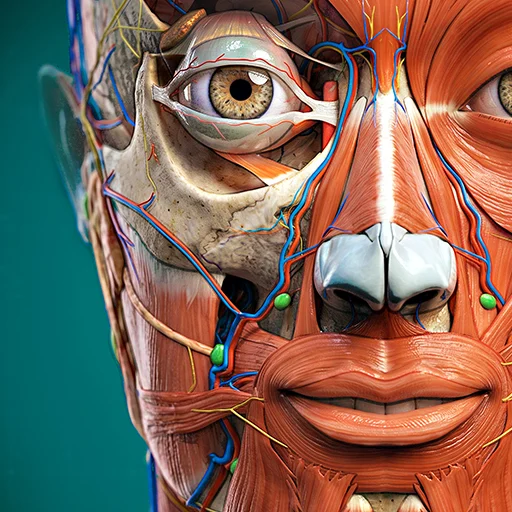
The doctor holds the X-ray up to the light, points to a clear line on your forearm and says, “the fissure is here, on the radius.” You nod in agreement, unsure whether the radius is on the thumb or little finger side.
Those who look for X-ray images on their cell phones want exactly that: to see what the skin hides. 3D anatomy apps put an entire human body on the screen, which you rotate with your finger, peeling back layer by layer and reducing to the skeleton with a single touch. In this guide, you'll see which app to choose, how to get to the bones and organs in seconds, and where to find the image of your own exam. And yes: the radio is right next to your thumb.
Anatomy Learning: the whole body in 3D in the palm of your hand.
Anatomy Learning has a 4.8 rating on Google Play, over 170,000 reviews, and more than 10 million downloads. It also has a 4.8 rating on the Brazilian App Store. It was designed for students of medicine, nursing, physiotherapy, and dentistry, but anyone curious can use it on their first try.
- Complete 3D model: The body rotates to any angle and zooms in down to the detail of a joint.
- Layer by layer: Remove a structure and the app shows you what's right below it.
- Systems that switch on and off: Bones, ligaments, joints, muscles, heart, arteries and veins, nervous system, sensory organs, and the respiratory, digestive, urinary, and reproductive systems, both male and female.
- Over 6,000 points identified: Each part of the model has a name, according to international anatomical terminology.
- Anatomy in cross-sections: Body slices facing those studying radiology.
- Animations: Muscles and joints move on the screen to show how each movement happens.
- Over 500 quizzes: The app asks for a structure, and you tap on it in the 3D model.
- In Portuguese: and in nine other languages, including Spanish, English, French, and German.
The download is free on Google Play and the App Store, and the app has in-app purchases.
How to view the skeleton and organs in Anatomy Learning
- Install Anatomy Learning using the button at the top of this page, on Google Play, or on the App Store.
- Open the app and wait for the 3D model to appear on the screen.
- Drag one finger to rotate the body in any direction. Spread two fingers to bring them closer together, and pinch them together to move them apart.
- In the systems menu, turn off the muscles and organs and leave only the bones. It's the view that most closely resembles an X-ray.
- Touch a bone to see its name. Try the forearm: the radius and ulna appear side by side.
- Connect the other systems back together and start removing the structures above. Take out the chest muscles and ribs, and the heart will appear between the lungs.
- Finish with a quiz: the app asks for a structure and you tap on it in the model. Got it wrong? Rotate the body and try again.
Where to view the X-ray of your exam
X-rays are performed in a clinic or hospital using an X-ray machine. After the examination, many laboratories release the images and report on their own portal or app, using the access information provided during the consultation. With the report in hand, the anatomy app helps locate the bone or organ in question on the model and understand its location. The app shows what the body looks like inside; pain, swelling, or doubts about the results should still be discussed with the doctor.
Anatomy – 3D Atlas: Muscles from Superficial to Deep
The Anatomy – Atlas 3D app, from Catfish Animation studio, has a 4.7 rating on Google Play, over 5 million downloads, and also a 4.7 rating on the Brazilian App Store. Its strength lies in the level of detail a student looks for.
- Layered muscles: From the most superficial to the deepest, one level at a time.
- Transparency: Leave a translucent structure and see what's behind it.
- Profile for each muscle: Origin, insertion, innervation, and action appear upon selection.
- Many systems: Skeleton, muscles, heart and blood vessels, nerves, respiratory, digestive, urogenital, endocrine and lymphatic systems, as well as eyes and ears.
- Two languages at the same time: The terms appear in Latin, Portuguese, and ten other languages, two of them together on the screen.
Premium features are available through a weekly or annual subscription. On Android, the app requires version 8.0 or newer and at least 3 GB of RAM.
BioDigital Human: the body and diseases in 3D
BioDigital Human has a 4.2 rating on Google Play, over 1 million downloads, and a 4.7 rating on the Brazilian App Store. Its library boasts over 700 3D models, with more than 600 depicting health conditions such as heart disease, cancer, and injuries. Users can rotate, zoom, draw on the model, dissect it, and share it. The free version allows 10 model views per month and stores up to 5 models in your library. The Personal Plus plan, listed in the store at US$19.99 per year, unlocks the entire collection.
TeachMe Anatomy: for those studying for the exam
TeachMe Anatomy has a 4.5 rating on Google Play, over 1 million downloads, and a 4.8 rating on the US App Store. It features over 750 interactive 3D models, over 600 articles written and reviewed by doctors, over 2,000 illustrations, over 1,900 quiz questions, and over 2,500 flashcards. The articles, illustrations, and questions work offline. The content is available in English and Spanish.
Tips for exploring the body from the inside out.
- Start with the skeleton: The adult body has 206 bones. Turn on only this system, rotate the model, and look for the ones you know by name.
- Assemble the body from the inside out: Connect the bones first, then the muscles, then the organs. Each layer makes more sense once you've seen the one underneath.
- Use the tablet, if you have one: On a larger screen, the names become legible and small details, such as the bones of the hand, appear better.
- Turn the game around with the kids: Ask us to find the femur, the largest bone in the body, or the heart hidden behind the ribs. The Anatomy Learning quiz does the rest.
- Student, use two languages: In Atlas 3D, place Latin alongside Portuguese and memorize official names without extra effort.
Which app to choose?
| Application | Best for | Note on Google Play | Downloads |
|---|---|---|---|
| Anatomy Learning | View the entire body in 3D, from skeleton to organs. | 4,8 | 10 mi+ |
| Anatomy – 3D Atlas | Muscles in layers, with the origin and function of each. | 4,7 | 5 mi+ |
| Human BioDigital | View diseases and injuries in 3D. | 4,2 | 1 mi+ |
| TeachMe Anatomy | Study with articles, quizzes, and flashcards, in English and Spanish. | 4,5 | 1 mi+ |
If you want to see the inside of the body today, start with Anatomy Learning: rated 4.8, with over 10 million downloads and the entire skeleton at your fingertips. Install using the button at the top of this page, turn off the muscles, and rotate your first 3D skeleton.