We all have old photos that we hope will stay in good condition, whether they're relatives we don't know or people we don't know, and we've found the best apps to restore old photos in high digital quality.
Or simply, photos of the places we live and visit, with the pristine quality we want to find.
The good news is that today, with the help of cell phones, it's possible to restore sharpness and vibrancy to faces, objects, and places using artificial intelligence.
Before we begin, it's worth understanding the limitations of the result: the AI doesn't recover what the photo lost, it... recreates The missing details are obtained from what has been learned from millions of other images. Therefore, the final file is an approximate reconstruction, and facial features, colors, and textures may differ from the original—the more blurred or small the photo, the greater the chance that retouching will "invent" features. Always keep the original file and, when fidelity is important (documents, historical or family photos), confirm the result with a professional restorer or a digitization laboratory.
With the apps mentioned below, you can give them a new look. Check out apps to restore old photos in high digital quality.
Remini
The application Remini restores old photos, converts low-resolution images and videos using state-of-the-art cinematic AI (Artificial Intelligence) technology.
Remini has processed more than 100 million photos and videos, so its programs have been refined hundreds of times to become what it is today.
It uses its artificial intelligence technology to correct blurry and low-resolution images. The improvement is usually significant in photos that are only out of focus; however, in very small or heavily damaged faces, the application tends to restore smoothed and generic features that resemble the person without being exactly them.
Google Photoscan
The Google Photoscan app uses highly intelligent technology to digitize your photos. Start by ensuring a smooth transition from the analog world to the digital world.
Digitizing your photos from the past with the scanner of the future is a proposal from Google that incorporates intelligent scanning technology into our work.
You don't need a virtual scanner, just use your phone's camera. The best thing about this app is that it doesn't just enhance digital images.
Furthermore, when we provide multiple photos of the same image, it chooses the best one from each component to restore the final image.
READ TOO:
- Applications to transform photos into drawings
- Applications to remove photo background
- Virtual haircut simulator
Deep Nostalgia
Deep Nostalgia was an app that was born as a genealogy website MyHeritage and went viral just a few days after its launch.
Software to bring old family photos to life based on photo manipulation and possibly artificial intelligence, adding possible gestures.
The application uses artificial intelligence methods to automatically bring faces to life in images uploaded to the system.
Today, one of these applications makes us wonder how far we can go with artificial intelligence.
One of the most impressive features of Deep Nostalgia is that, when applied to images of people we know, the creative touch looks very real. Still, it's good to remember: the movements come from pre-made animations applied to the face, and not from gestures that the person actually made.
On social media, some described Deep Nostalgia as “magical,” while others found it disturbing.
Colorize
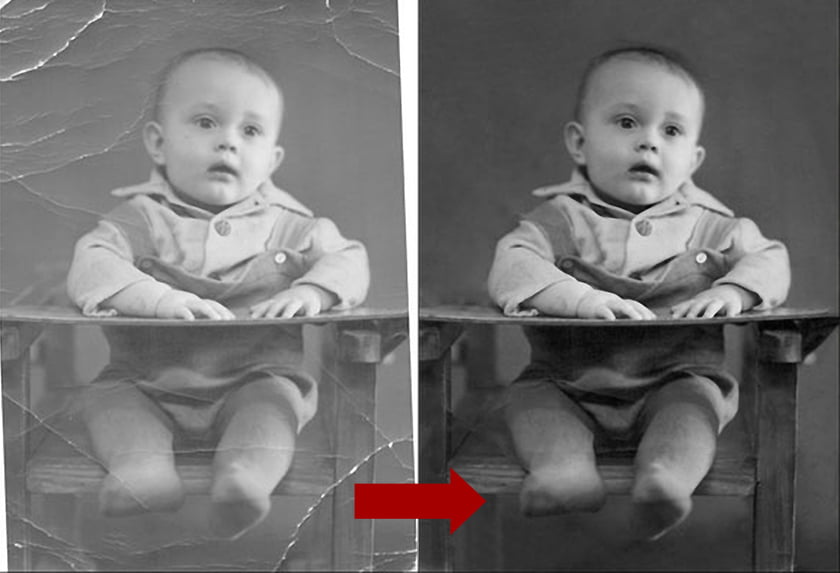
This app allows you to restore and colorize old photos. Its features and filters work well because they work with artificial intelligence.
It offers three possibilities: color, highlight and retouch. The first is very popular because it automatically improves image quality. Click to help remove blemishes from photos.
The app also offers simple color filters and attempts to guess the original color—the result is an algorithmic guess, so the clothing or scenery might take on a shade it never had before. The user's favorite parts are usually shared before and after.
Also, fix the preview and disable the display. So, with Google Photos, we can classify photos, edit information and share them with whoever we want.
Conclusion
If you liked the tips mentioned above, share it with friends and family so they can also recover photos.
To download the applications above, simply access the Google Play Store Or the App Store.
Before deciding, check these points.
- App weight. Full-featured editors can exceed 300 MB. On devices with limited storage, a lightweight app will handle the basics without crashing.
- Preserve the original. Good editors save a copy. Be wary of any app that overwrites the file directly.
- Where do your images go?. Tools that use cloud processing upload the photo. Read the policy before sending an image of a document or a child.
- It works without internet. Editors who process photos on their own device work offline. Those that rely on a server do not—and send your photo externally.
What these apps don't do
Every category has a limit, and knowing this one's limit saves time and money by avoiding those who promise more than what's available.
- Recovering deleted photos only works on images that haven't been overwritten yet, and the chances of success decrease with each use of the device.
- They don't remove watermarks from third-party photos. Besides not working properly, using the image without a license is a copyright violation.
- No app can see through clothes or walls. What exists is simulation — a generated image, not a captured image.
- Beauty filters alter the image; they don't alter the person. It's important to remember this when comparing the result to an unedited photo.
Common questions
Is a free editor safe?
Check the permissions requested. A photo editor does not need access to contacts, messages, or microphone.
Which format should I save it in?
JPEG for general use, PNG when there is transparency or text, and the original format when archiving.
Is the premium version worth paying for?
It's worthwhile if you edit frequently and need high-resolution export or to remove the watermark. For occasional use, the free version is sufficient.
Can I edit without a watermark for free?
Yes, in several applications, but with limited features. Check beforehand by saving a test image.
Does the photo lose quality when edited?
Each export recompresses the file. Edit once and save, instead of saving after each adjustment.
How to truly take advantage of it.
- Save only once. Each export process recompresses the file. Make all the necessary adjustments and export at the end.
- Crop with the purpose of taking into account where the photo will end up. Square and vertical 4:5 for social media, 16:9 for screen. Crop after exporting and recompress again.
- Work on a copy. Duplicate the image before editing. Good apps do this automatically, but double-checking prevents losing the original.
- Export at the highest quality available. If you're going to print, look for the high-resolution export option — some free versions reduce the resolution without warning.
Common mistakes that are costly
- Send a photo of a document or a child to an editor who processes it in the cloud.
- Saving after each adjustment and watching the image lose sharpness without understanding why.
- Increasing the resolution in the hope of revealing detail — the program estimates pixels, it doesn't retrieve information.
- Discovering the watermark only when exporting, after half an hour of editing.
Before installing: what's already on the device
The phone's built-in gallery editor already handles cropping, light adjustment, object removal, and perspective correction in recent versions of Android and iPhone. For quick adjustments, it solves the problem without installing anything or sending the image externally.