The digital age has brought countless conveniences to our daily lives, and one of them is the possibility of trying out a new look before sitting in the salon chair. Changing your hairstyle is a decision that often weighs heavily precisely because it's not easy to go back. With simulation apps, you can get a close preview of how different styles would look on you, without actually changing anything.
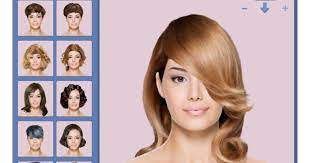
Let's make it clear from the start: these apps work with image editing and artificial intelligence on your photo. The result is a... simulation, This is not an accurate prediction. The actual texture of your hair, its volume, density, and how it falls are not faithfully reproduced by any app. Use it as a source of inspiration and as a visual reference to show your stylist—the final decision still rests with the hairdresser.
Best free apps to simulate haircuts
All the apps below have been verified in the official stores and are available for free download, with optional paid features. Download only from Google Play or the App Store: APK files from third-party websites are the main gateway for malicious apps.
1. YouCam Makeup
O YouCam Makeup It's the best-known in its category and goes beyond hair: it also simulates makeup, accessories, and skin adjustments. In the hair section, it offers a large catalog of cuts and colors, with real-time application via the camera or over a saved photo.
It's the best option for those who want to try a complete visual transformation all at once, and not just a haircut. The app is free, with ads and an optional subscription to unlock extra filters.
Download on Google Play · Download from the App Store
2. Hair AI: Try Hairstyles
O Hair AI It focuses exclusively on hair. You send a front-facing selfie with good lighting, and the app generates versions of you with different haircuts — short, medium, bangs, layers, curls.
Since the processing is done by artificial intelligence, the result can vary considerably depending on the quality of the photo. Front-facing photos, without glasses and with hair tied back, usually generate the most useful simulations.
3. Haircut & Color IA
This app addresses the two aspects that cause the most doubt before a change: length and color. It allows you to apply natural tones as well as bolder colors to your photo, helping you see if the shade matches your skin before spending money on dye.
The usual advice applies here: the color displayed on the screen does not correspond to the actual chemical result of a hair dye, which depends on your hair's base color. Take the image as a reference, not as a promise.
4. Hair My Style
O Hair My Style It has a lighter and more direct approach: a large collection of haircut and hairstyle templates for you to overlay onto your photo and manually adjust the size and position.
Because it's manual, it gives more control to those who have the patience to adjust it, and less automation for those who want immediate results. It's a good option for creating side-by-side comparisons before deciding.
5. HairHunt: AI Hairstyle Try-On
O HairHunt It organizes styles by face shape and trend, which helps those who don't even know where to start. Based on your photo, it suggests a set of haircuts and shows a simulation of each one.
The suggestions are generated automatically and do not replace the assessment of a professional, who takes into account the texture, density, and chemical history of your hair — information that no app can see in a photo.
6. Try On Hairstyle (iPhone)
For those who use iPhones and want a dedicated alternative, the Hairstyle Try On It's available on the App Store and works with its own catalog of men's and women's haircuts applied to your photo.
App Features and Benefits
Try before you decide.
The biggest benefit of these apps is reducing regret. Seeing a close approximation of what a short haircut would look like is enough for many people to discover they prefer to keep the length—or the opposite. They also serve as a source of inspiration, presenting styles you might never have considered.
Bring the reference to the salon.
In practice, the most useful approach is this: save two or three mock-ups and show them to the hairdresser. The conversation becomes much more objective when there's a reference image, even an approximate one, than when you try to describe the haircut with words.
Privacy precautions
These apps process photos of your face. Before installing, it's worth reading the privacy policy on the app store's listing and checking if the images are sent to external servers. Whenever possible, delete the photos from the app after use and avoid granting access to your entire gallery when the app offers the option to select only one image.
Common questions
Are the apps accurate in simulating the cuts?
No. They produce a visual approximation, useful as a reference, but the actual result depends on the texture, volume, and density of your hair—factors that the app doesn't measure. Consider the image as an idea, not as a portrait of the final result.
Do these apps replace the opinion of a professional?
No. They don't assess the health of your hair or its chemical history. Consulting a hairdresser remains essential before any major change.
Are they suitable for all hair types?
Catalogs tend to be more comprehensive for straight and wavy hair. For curly and kinky hair, the variety of styles is still smaller in most apps, and the simulation tends to be less accurate.
Are they really free?
All can be downloaded for free. Most display ads and offer an optional subscription to unlock extra features or remove advertising. When applicable, charges are made within the store itself and can be cancelled in your account.
Conclusion
Haircut simulation apps are fun and genuinely useful tools for exploring possibilities without risk. They don't predict the exact result and don't replace a hairdresser, but they help organize the idea in your head and better communicate what you want. Download them from official stores, test them calmly, and take your best simulations to the salon for a consultation.
Before deciding, check these points.
- Resolution of the exported file. Some reduce the image size when exporting without a signature. If the photo is for printing, this is a crucial factor.
- Watermark on the free version. This is the most common trick: the app lets you edit for free, but then stamps the logo on it when you save. Check this before investing your time.
- App weight. Full-featured editors can exceed 300 MB. On devices with limited storage, a lightweight app will handle the basics without crashing.
- Preserve the original. Good editors save a copy. Be wary of any app that overwrites the file directly.
What these apps don't do
Every category has a limit, and knowing this one's limit saves time and money by avoiding those who promise more than what's available.
- Recovering deleted photos only works on images that haven't been overwritten yet, and the chances of success decrease with each use of the device.
- They don't remove watermarks from third-party photos. Besides not working properly, using the image without a license is a copyright violation.
- No app can see through clothes or walls. What exists is simulation — a generated image, not a captured image.
- Beauty filters alter the image; they don't alter the person. It's important to remember this when comparing the result to an unedited photo.