
First of all, the truth about these apps: The cell phone doesn't have a weight sensor. Devices Android devices can't weigh anything. — the “digital scale” apps for Android are simulations, pranks designed to fool those who don't know what they're talking about. Older iPhones with 3D Touch (From the 6s to the XS models) the screen measured the force of the touch, and some apps used this to attempt a rough estimate of very light objects. On current iPhones, which use Haptic Touch, even that is not possible.
In other words: view these apps as fun, Never use a digital kitchen scale as a measuring tool. For weighing recipe ingredients, pet food, mail, or anything that requires a reliable number, a real digital kitchen scale is the best option—they're inexpensive and weigh from 1 gram upwards. Below we explain why this limitation exists, what the apps actually do, and which ones are available in official app stores.
Why can't cell phones weigh objects?
A scale works with a load cell: a component that deforms under weight and transforms that deformation into a number. No smartphone has this component. What a cell phone has is an accelerometer, gyroscope, magnetometer, proximity sensor, camera, and microphone—none of which measure mass.
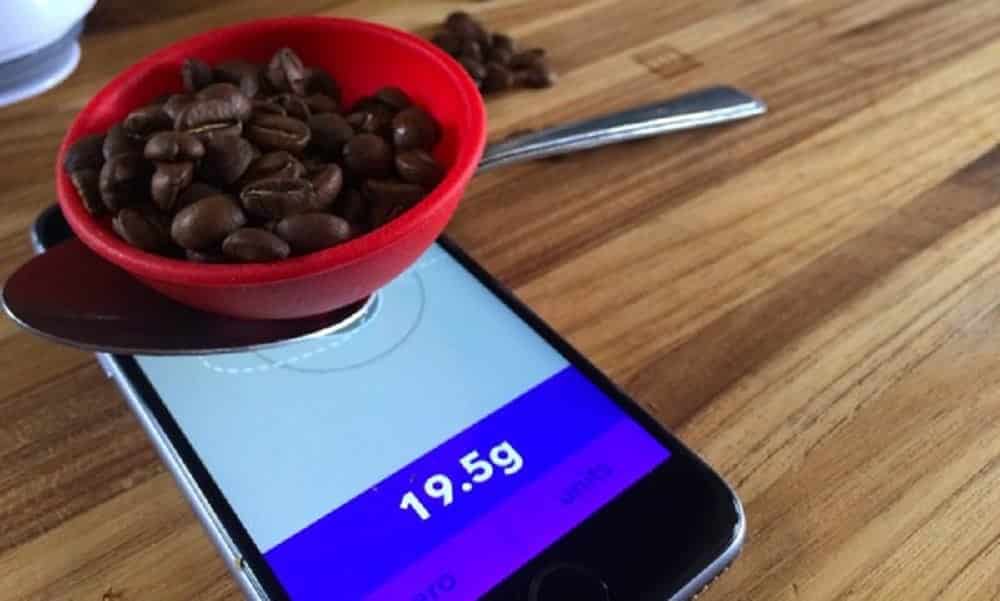
The only partial exception was Apple's 3D Touch, present between the iPhone 6s and the iPhone XS: the screen detected the intensity of pressure. With a small object placed on it, it was possible to estimate a force — but with a large margin of error, depending on temperature, case, screen protector, and even whether the object's surface was conductive. Apple retired the feature, and iPhones released afterward do not have this measurement.
And it's important to emphasize a safety point: placing objects on your cell phone screen can scratch, crack, and damage the device. It's not worth risking an expensive phone for a prank.
"Digital scale" apps available in official app stores.
The following apps are available in official app stores and have a free version. All should be understood as... simulation or rough estimate — the descriptions of several of them warn that this is for entertainment purposes only. Download only from Google Play or the App Store.
Balança Digital de Cozinha (Android)
Balança Digital de Cozinha
Note: N/A
Downloads: 100K+
Size: 20 MB
Price: Free
Platform: Android
It's the best-known in its category on Android. The interface mimics the display of a kitchen scale and reacts to touch on the screen. Since Android doesn't have a weight sensor, the displayed value... does not correspond to the actual weight. Regarding the object: it functions as a joke and as a prop for videos and pranks. For recipes, use a real scale.
Balança Digital Gramas Peso (Android)
It follows the same logic: animated display, scale sound, and result in grams. The description in the store makes it clear that it's an entertainment app. It's for playing pranks on friends, not for checking the amount of flour in a cake. View on Google Play.
Balança de Gramas: NutriClique (Android)
In addition to the simulated scale screen, it includes tables of food portions and equivalencies — and it is precisely this part that has some practical use, because it helps to estimate quantity by household measure (spoon, cup, unit). The number that appears on the "display" remains a simulation. View on Google Play.
TouchScale (iPhone)
This iOS app uses touch screen input to estimate the weight of very small objects. The weight depends on the device model and the type of object, and the result varies considerably from one attempt to another—treat this as a curiosity, not a measurement. View on the App Store.
Balança Digital Estimador Peso (iPhone)
As the name suggests, the app works with I estimated. The interface is simple, with a history of recent attempts. The same warning applies: no current iPhone measures weight, so the displayed value is approximate and without guarantee. View on the App Store.
What really solves the problem when you need to weigh something?
- Digital kitchen scaleIt measures from 1 gram, supports several kilos, and is the right choice for recipes, diets, and portions. It's the cheapest item on this list.
- Precision pocket scale: for jewelry, spices and very lightweight items, with a resolution of 0.01 g.
- Trunk scale (hook dynamometer)This solves the classic problem of checking baggage weight before a flight.
- Home remediesWhen cooking on the fly, conversion tables (1 cup of flour ≈ 120 g, 1 tablespoon of sugar ≈ 12 g) are usually more reliable than any weighing app.
- Scales with BluetoothIf you want your phone involved, there are physical scales that send the measurement to an app. Then the number comes from the correct device, and the phone just records it.
FAQ – Frequently Asked Questions
Os aplicativos de balança digital são precisos?
No. On Android, the result is simulated because the device doesn't have a sensor capable of measuring weight. Older iPhones with 3D Touch provided a rough estimate; current models don't even have that.
Existe algum app que pese pela câmera?
No. The camera sees shape and size, but it has no way of knowing what the object is made of or its density. Weight cannot be determined from a photograph.
Posso apoiar objetos na tela do celular?
We do not recommend it. In addition to scratching and soiling the screen, objects with sharp edges or greater weight can crack the glass. The risk is not worth it.
Esses aplicativos são gratuitos?
Yes, the apps mentioned here have free versions in official app stores, usually with ads. Some offer ad removal for in-app purchases.
Conclusion
There are tons of apps in app stores that "turn your phone into a scale," and they're fun—as long as you know it's a simulation. No smartphone has the necessary sensor to... weighing objects, And nothing downloaded from the store changes the device's hardware.
If you're looking for something fun, install one from the official store and enjoy. If you're looking for a reliable number—a recipe, a diet plan, luggage tracking, an order—a simple digital scale will do the trick at a low price and without putting your phone screen at risk.
What to look for before installing
- Integration with certified device. When there is a real measurement, it comes from equipment with a sanitary registration — the app only receives the number.
- Who developed it?. Give preference to apps from healthcare institutions, universities, or companies with an identified technical manager.
- Export for the doctor. A report in PDF or spreadsheet format makes the consultation much more productive.
- What the app actually does. Recording information is different from measuring. Health apps organize data that you or a device provide.
The limits: what no app does
Before installing, it's worth managing your expectations: there are things that no app in this category delivers.
- The cell phone does not measure blood pressure, glucose, body temperature, nor does it perform imaging tests. There is no sensor for that in the device.
- Estimates of steps, calories, and sleep are approximations based on motion sensors, with a significant margin of error.
- They are not a substitute for prescribed medication or treatment, and should not be used to guide dose changes.
- An app that promises to detect disease through photos, sounds, or questionnaires is not supported by any evidence — seek professional help.



