
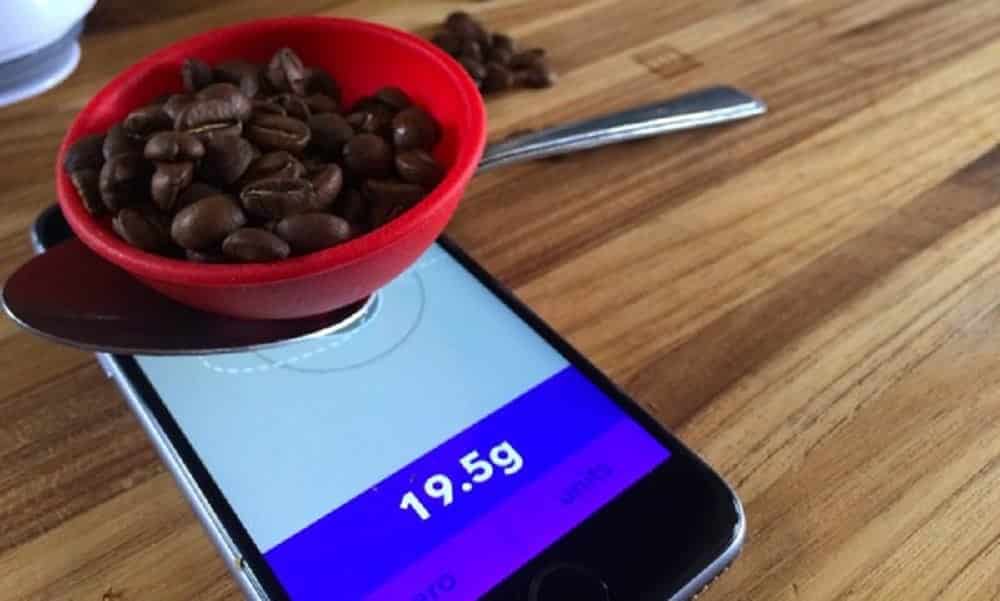
Amid the technological revolution, smartphones have taken on increasingly innovative and surprising functions. One of these features is the ability to weigh objects using just your cell phone. This became possible thanks to the development of specific applications that use the devices' sensors to estimate weights. This new tool can be especially useful in situations where a traditional scale is not available.
The concept behind these applications is simple, but their implementation involves complex sensing technologies and calibration algorithms. Using the accelerometer, which is a sensor present in most smartphones, these applications can calculate the weight of an object by measuring the force applied to the screen or certain surfaces. Let's explore some of these applications and understand how they work, as well as discuss their limitations and possibilities.
How Weighing Applications Work
Before we dive into specific apps, it's important to understand how they work. Most of these apps calibrate the device's accelerometer to detect changes in the force applied to the screen or a supported surface. This force is then converted into a weight estimate, which, although it does not replace traditional scales in accuracy, serves well for quick estimates and casual checks.
Working Scale Free
One of the best-known applications in this category is “Working Scale Free”. This app uses your smartphone's sensors to weigh small objects that are placed on a surface like a sponge or pillow. The app requires manual calibration, but once set up, it offers a practical and relatively accurate way to estimate the weight of objects up to about 100 grams.
The “Working Scale Free” is ideal for weighing items such as jewelry, spices and other small goods. However, accuracy may vary depending on calibration and smartphone model, so it is recommended for uses where extreme accuracy is not critical.
Precision Digital Scale
The “Precision Digital Scale” promises a slightly different approach. This app allows users to use their smartphone in conjunction with an inflated balloon or air-filled plastic bag to create a more weight-sensitive surface. The accuracy of this app may be slightly higher than that of Working Scale Free, especially with correct calibration.
This app is useful for those who need a more accurate weight measurement but still not available from a professional scale. It can be a great tool for amateur cooks or anyone who needs to check the weight of small packages before shipping them.
Scale Estimator
The “Scale Estimator” app offers similar functionality, but with a cleaner and more straightforward interface design. This app is easy to use and provides step-by-step instructions for calibration, which helps you obtain more accurate results.
In addition to its user-friendly interface, Scale Estimator also includes a tutorial that helps users correctly place objects on the device, maximizing measurement accuracy.
Weight Scale Estimator
“Weight Scale Estimator” is another application that uses your smartphone's accelerometer to estimate the weight of objects. This app is known for its simple and effective interface, which helps users perform quick and easy measurements.
Ideal for those who need a quick weight estimate for non-critical purposes, the Weight Scale Estimator is a useful tool for everyday life, especially in situations where a conventional scale is not accessible.
Pocket Scale
Finally, “Pocket Scale” is an application that stands out for its intuitive design and ease of use. It allows users to weigh small objects by placing them on a flat, flexible object, such as a plastic lid or cardboard, which is then placed on the screen.
Pocket Scale is suitable for weighing items such as coins, grams of tea or small pieces of hardware, offering a practical and portable solution for many weighing needs.
Limitations and Possibilities
Despite being innovative, these applications have their limitations. The accuracy of measurements often depends on the calibration of the device and the conditions under which weighing is performed. However, the possibilities are vast, and these applications continue to evolve, bringing improvements in accuracy and usability.
Frequently Asked Questions (FAQ)
- Are mobile weighing apps accurate?
- They do not replace high-precision scales, but are useful for quick estimates and casual checks.
- Can I weigh any object with these apps?
- They are most effective with light, small objects. Objects that are too heavy or too light may not be detected correctly.
- Is any special equipment required?
- Some applications may require specific surfaces such as sponges or balloons to increase sensitivity.
Conclusion
Mobile weighing apps are fascinating examples of how technology can be applied in innovative ways. Although they are not perfect, they offer practical solutions for everyday situations, exemplifying the potential of smartphones as multifunctional tools. As technology advances, we can expect significant improvements in these applications.
Before deciding, check these points.
- What the app actually does. Recording information is different from measuring. Health apps organize data that you or a device provide.
- Integration with certified device. When there is a real measurement, it comes from equipment with a sanitary registration — the app only receives the number.
- Export for the doctor. A report in PDF or spreadsheet format makes the consultation much more productive.
- What happens to your data?. Health data is sensitive. Check if it's being shared with third parties and if it's possible to delete everything.
The limits: what no app does
Every category has a limit, and knowing this one's limit saves time and money by avoiding those who promise more than what's available.
- Estimates of steps, calories, and sleep are approximations based on motion sensors, with a significant margin of error.
- They don't provide diagnoses. No app can replace a professional evaluation.
- They are not a substitute for prescribed medication or treatment, and should not be used to guide dose changes.
- The cell phone does not measure blood pressure, glucose, body temperature, nor does it perform imaging tests. There is no sensor for that in the device.
How to truly take advantage of it.
- Check out the privacy policy. Health data is sensitive data. Check if it is being shared with third parties and if it's possible to delete everything.
- Write down the value along with the time. Date and time transform random numbers into useful historical data for the professional.
- Use certified equipment when taking measurements. The cell phone doesn't measure; the equipment with sanitary registration does the measuring. The app only stores the number.
- Generate the report before the query. Exporting as a PDF and having it printed or on your phone greatly shortens the conversation.
Common mistakes that are costly
- Believing that a cell phone measures blood pressure, glucose, or body temperature is wrong; there is no sensor for that in the device.
- Install an app that promises to detect disease through photos, sounds, or questionnaires.
- Changing medication dosage based on a number seen in the app.
- Swap in-person consultations for apps — none of them provide diagnoses.
What the cell phone itself already does.
Android and iPhone already come with a native health app that consolidates steps, sleep, and measurements sent by other devices, with privacy controls by data type. It's usually the safest place to store your history, and you can export it to take to your doctor.



