First and foremost, the most important thing: no mobile app measures glucose. The camera, fingerprint sensor, and screen of the device cannot obtain the blood glucose value. The measurement continues to depend on a glucometer with reagent strip or of a continuous monitoring sensor Applied to the skin, both devices are regulated. The applications in this article are for register, organize and track The values you've already measured—and that alone makes a big difference in managing diabetes.
If you find any app promising to measure glucose simply by touching your finger to the camera, be suspicious: besides not working, relying on a fabricated number can lead to dangerous decisions about diet and medication. None of the content here replaces the guidance of your doctor or the healthcare team that is monitoring your case.
Having issued that warning, let's get down to business: diabetes requires constant monitoring, and a well-organized diary helps healthcare professionals adjust treatment based on real data, not memory. That's exactly the role of the apps below.
Why monitoring glucose makes a difference
Those living with type 1 or type 2 diabetes need to monitor a set of interacting variables: what they ate, how much they exercised, what medication they used, how they slept, and how this showed up in their blood sugar levels. Writing everything down on paper works, but it's easy to lose track and almost impossible to spot patterns.
A registration application solves three concrete problems:
- Don't lose the historical record. Months of measurements are stored and can be displayed in a graph.
- It shows a trend. It becomes clear if the high values are concentrated at breakfast, in the evening, or after a particular meal.
- It makes consultation easier. Instead of describing it from memory, you show or send a report with the data for the period.
It's important to emphasize the limitation: the app organizes the information, but it is the healthcare professional who interprets and adjusts treatment. Changing medication dosages on your own based on a chart is risky.
Apps for recording and monitoring glucose levels.
All the apps below are published on Google Play. None of them measure glucose on their own: they receive values entered by you or imported from a compatible device.
1. mySugr
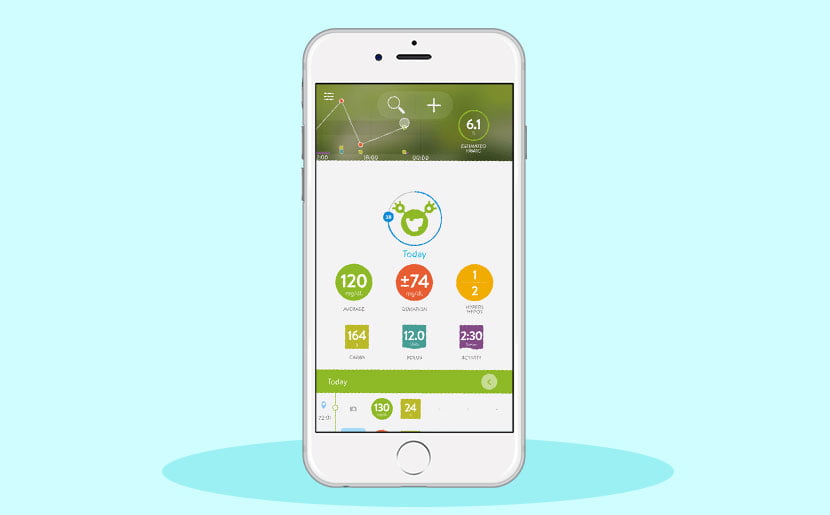
O mySugr It's one of the world's best-known diabetes diaries. You record your measured blood glucose levels, food intake, physical activity, and medication; the app generates graphs and statistics for the period, and also allows you to export PDF reports to take to your appointments.
One distinguishing feature is the user-friendly language, with gamification elements that encourage consistent data entry—the most difficult aspect for beginners. There are free resources and additional features in the paid version, and the app can receive data from compatible glucometers via Bluetooth, eliminating manual data entry.
2. Glic
O Glyc It's a Brazilian diabetes diary, designed for the local context: everyday foods in Brazil, a Portuguese interface, and a user community from the country. It records blood glucose, carbohydrates, insulin, and activity levels, and presents averages and trends over time.
For those bothered by translated apps, the familiarity with Brazilian food in carbohydrate calculations is often the deciding factor.
3. Diabetes:M
O Diabetes:M It is the most complete — and also the most comprehensive — on this list. In addition to the diary, it offers a configurable bolus calculator, detailed meal logging, statistical analysis, and report export in various formats.
This is the choice for those who already have a carbohydrate counting routine and want fine control over the parameters. Important: any dose calculation settings must be defined together with your doctor or nutritionist, never on your own.
4. OneTouch Reveal
O OneTouch Reveal It is the companion app for the OneTouch line of glucometers. It automatically receives measurements from the device and organizes the results into color-coded panels, highlighting when values fall outside the range agreed upon with your doctor.
The clear advantage is eliminating typing errors. The limitation is also clear: it mainly makes sense for those using a compatible meter from the same brand.
5. FreeStyle LibreLink – BR
O FreeStyle LibreLink – BR This is the FreeStyle Libre continuous monitoring system app. Here's an exact explanation of how it works: the glucose is read by the... sensor applied to the arm, a medical device sold separately. The cell phone simply brings itself close to the sensor to receive the reading and display the history.
In other words, without the sensor, the app shows no value. This is the clearest way to illustrate the point of this article: the number always comes from a measuring device, never from the phone alone.
What does glucose actually measure?
To avoid any doubt, it's worth separating the equipment that produces the number:
- Glucometer with reagent strip. It is the most common and accessible method. A drop of blood obtained with a lancet reacts with the strip, and the device displays the value in a few seconds.
- Continuous monitoring sensor. A thin filament is placed under the skin and estimates glucose in the interstitial fluid throughout the day, eliminating the need for frequent finger pricks. It costs more and has an expiration date per sensor.
- Laboratory test. Fasting blood glucose, glucose tolerance test, and glycated hemoglobin are performed in a laboratory and remain the gold standard for diagnosis and monitoring.
The cell phone comes in later: storing, organizing, and presenting these numbers in an understandable way.
How to choose the right app for you
- Do you already have a meter of a specific brand? Start with the manufacturer's app, because automatic synchronization eliminates manual work.
- Do you count carbohydrates? Choose an app with a robust food database and a configurable calculator.
- Do you want the simplest solution possible? A straightforward journal, with few entries, increases the chance of you maintaining the habit.
- Will you share this with the healthcare team? Check if the application exports reports as PDFs or spreadsheets.
- Are you concerned about privacy? Health data is sensitive. Read the privacy policy, check the data security section on the store's listing, and choose apps that allow you to export and delete your history.
Good practices in using a journal.
The app is only helpful if the data is reliable. Some simple practices improve the quality of the record:
- Record the measurement immediately afterward; delaying leads to forgetfulness and inaccurate recorded values.
- Note the context: fasting, before or after a meal, after exercise. Without this information, the graph loses its meaning.
- Don't delete bad readings. It's precisely the values outside the range that interest your doctor.
- Check the expiration date of the test strips and the calibration of the device; a perfect diary with incorrect measurements is useless.
- Bring a printed copy of the report or the one on your phone to the consultation and ask for help interpreting the trends.
What else is worth recording besides the blood glucose level?
A single value says little. What provides context is the set of information surrounding it, and that's where the application becomes truly useful. It's worth noting:
- Meals. What was eaten and, where applicable, an estimate of carbohydrates. Many patterns only appear when the meal is recorded along with the measurement.
- Medication. Schedule and dose as prescribed, so that the healthcare team can correlate the treatment with the results.
- Physical activity. Type, duration, and intensity. Exercise influences blood glucose levels for several hours after it has ended.
- Sleep and routine. Sleepless nights, travel, and time changes frequently appear in the statistics.
- Symptoms perceived. Writing down how you felt helps the professional interpret episodes that fall outside the norm.
You don't need to fill everything out from day one. Start with the essentials—the amount, time, and context of the measurement—and add fields as the habit takes hold. Simple, consistent logging yields far more results than complete logging that's abandoned in the second week.
Integration with watches and health apps
Several diabetes diaries communicate with mobile health platforms, such as Health Connect on Android and the Health app on iPhone, as well as smartwatches and fitness trackers. This allows steps, exercise, and sleep data to be automatically added to the diary, reducing typing.
The same warning from the beginning of the article applies here: watches and bracelets track activity, heart rate, and sleep, but... They don't measure glucose.. When an app displays blood glucose levels alongside watch data, the number comes from a glucometer or continuous glucose monitoring sensor, never from the watch itself.
When activating any integration, review what data is being shared and with whom. Health information is sensitive data, and most platforms allow granting access by category, rather than releasing everything at once.
Common questions
Is there an app that measures glucose using a cell phone camera?
No. No app available in official app stores obtains glucose values via camera, screen, or fingerprint reader. Apps that suggest this are unfounded and should not be used to guide treatment.
Is the app's data accurate?
Accuracy comes from the measuring device, not the app. The app only stores and organizes the measurements. If the glucometer is out of calibration or the test strip is expired, the reading will also be incorrect.
Can I share my information with the doctor?
Yes. Most apps allow you to generate PDF reports or share access with a professional. This usually makes the consultation more objective, because the doctor sees the complete history for the period.
Do these apps replace consultations or exams?
No. They are record-keeping tools. Diagnosis, medication adjustment, and follow-up remain the responsibility of the healthcare team, based on tests and clinical evaluation.
Are they free?
All can be downloaded for free, and basic registration functions are usually free. Some offer advanced features via subscription, and companion apps depend on purchasing the device or the corresponding sensor.
Common mistakes people make when starting to use a digital diary.
Three common pitfalls appear among those installing their first app. The first is choosing the most comprehensive app on the market right away: the excess of fields is discouraging, and data collection stops in the second week. The second is recording only the good measurements, which produces a beautiful but useless graph because it hides precisely what the professional needs to see. The third is relying on the app to make decisions that only the healthcare team can make—changing doses, skipping medication, or ignoring a value outside the range because "the graph looks good.".
The antidote to all three is simple: start with the minimum, record everything as it happened, and bring the history to the consultation instead of interpreting it yourself.
Conclusion
Cell phones don't measure glucose, but they're a great place to store and view what your glucometer or sensor has measured. Consistently using a digital diary transforms dozens of random numbers into a meaningful history, and it's this history that helps the healthcare team safely adjust treatment.
Choose the app that fits your routine, download it from your device's official app store, and keep your records up to date. And always follow the guidance of the professional who is monitoring your case—no app can replace that assessment.