
First and foremost, a necessary clarification: no app charges your cell phone using solar energy. An app is just software — it doesn't capture light, generate current, or charge a battery. That's done by a physical device: a foldable solar panel or a power bank with photovoltaic cell, connected to the device by cable. The app's role is different, and equally useful: to monitor how much energy is coming in, control the brand's portable charging station, measure the actual charging current, and help position the panel at the best angle relative to the sun.
Having made that distinction, portable solar charging is a practical and increasingly accessible solution for camping, hiking, long trips, fieldwork, and power outages. In this guide, we explain how the process actually works, how long it takes, what the limitations are, and which applications are available. that are available in official stores They are worth installing to keep track of all this on your cell phone.
How does solar charging work in practice?
The principle is the conversion of light into electricity. The photovoltaic cells in the panel generate direct current when they receive direct sunlight. This current passes through a controller, which adjusts the voltage to a safe value, and reaches the device — or an intermediate battery, which stores the energy for later use.
In practice, there are two main arrangements. In the first, the foldable panel directly powers the cell phone via the USB output: it works well in strong sunlight, but any cloud interrupts the charging, and some simple panels don't stabilize the current, causing the phone to connect and disconnect constantly. In the second arrangement, the panel charges a power bank or portable charging station during the day, and you use that battery to charge your cell phone whenever you want—including at night. This second format is much more reliable and is recommended for most people.
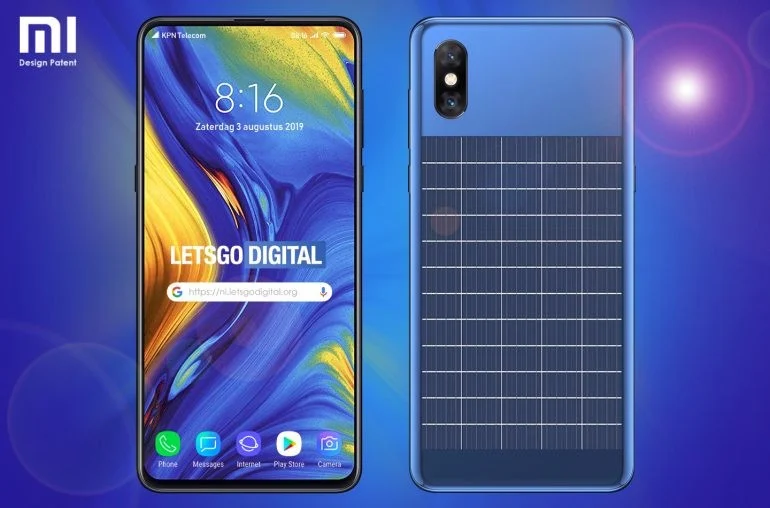
One detail that many people discover late: the Power banks with a solar panel on the lid. They don't actually charge from the sun. The cell area is too small, and a full recharge would take dozens of hours of direct exposure. In these models, the panel serves as an emergency resource to gain a few percentage points; the real recharge is done via a wall outlet. Foldable panels of 20 W to 100 W, with multiple panels, are the ones that produce energy in usable quantities.
What the app actually does
Since the app doesn't generate energy, it's fair to ask why install it. Its actual functions are these:
- Monitor the power station or the brand's power bank: Devices with Bluetooth or Wi-Fi send data to the app regarding solar input, battery level, output power, and temperature.
- Measure the current reaching the cell phone: Battery apps show how many milliamps are being used, which instantly reveals whether the panel is properly positioned or if the cable is the bottleneck.
- Help position the panel: Solar position apps indicate where the sun is and where it will be in the coming hours, preventing the shadow of a tree or wall from interfering with production.
- Record history: Some apps keep a history of the charge, which helps to compare days, angles, and settings.
- Update the device firmware: For portable stations, firmware updates are usually distributed through the brand's official app.
What no app can do: turn the sun on or off, "speed up" conversion, charge a phone without hardware, or remotely control a panel that lacks communication electronics. If an app promises any of these things, it's false advertising.
6 real-world apps to track solar charging
All the apps below are published in official app stores and can be installed via Google Play. Always check the developer's name in the app's information before installing.
1. EcoFlow
The official app of EcoFlow It is the control panel for the brand's portable charging stations and solar panels. After pairing the equipment via Bluetooth or Wi-Fi, it displays in real time the solar power input in watts, the battery level, the consumption of each output, and the estimated time remaining to complete the charge.
What you can do using the EcoFlow app:
- Monitor the panel's input power and notice, instantly, when a shadow reduces production;
- Turn the DC and AC outputs on and off without getting up from your chair;
- Set charge and discharge limits to preserve battery life during frequent use;
- View generation and consumption history by period;
- Update the device's firmware when the manufacturer releases patches.
It's important to understand the prerequisite: the app only makes sense for those who have an EcoFlow device. Without the compatible station or panel, there's nothing to monitor. The download is free.

2. Jackery
A Jackery EcoFlow is one of the best-known brands of portable power stations and foldable solar panels, widely used in camping and fieldwork. The official app serves a similar purpose to EcoFlow: it connects to the equipment and displays the battery status, solar input, and active outputs.
Key features:
- Real-time reading of the power that the panel is delivering to the station;
- Control your exit doors directly from your cell phone;
- Low battery and out-of-safe-range temperature alerts;
- Choose the charging mode, prioritizing speed or battery preservation;
- Access to brand documentation and support directly within the app.
As with the previous case, the connection requires a compatible product from the same brand. Older models may not have a communication module, and in that case, monitoring is only possible via the device's own display.

3. Anker
A Anker It is a leader in chargers, cables, and power banks, and its energy line includes solar panels and portable charging stations. The brand's app brings compatible devices together in one place, with charging information, status, and settings.
What is it used for in everyday life?
- Check the power bank's charge level without having to press the device's button;
- Adjust charging behavior in models that offer this control;
- Receive maintenance and firmware update notifications;
- Check the compatibility between the cable, charger, and power level supported by your cell phone.
This last point is more important than it seems: a bad cable limits the current and makes solar charging seem worse than it actually is. It's worth checking before blaming the panel.

4. AccuBattery
O AccuBattery It's one of the most respected battery apps on Android and works with any power source — including a solar panel. It measures charging current, estimates the battery's actual capacity over time, and shows the charging speed at any given moment.
Why it's useful in solar charging:
- It shows in milliamperes how much current is actually entering, allowing you to compare panel positions and find the best angle in practice;
- It reveals when the charge drops due to partial shading, dirt on the board, or high temperature;
- It estimates the remaining time to complete the charge based on the current, not a generic number.;
- It records the history of charging sessions, useful for evaluating whether it is worthwhile to increase the panel's power;
- It alerts you when the battery reaches a defined percentage, which helps preserve the health of the cell.
One technical caveat is in order: the readings depend on the sensors that each manufacturer provides to the system, so the values are a good approximation, not a laboratory measurement. Even so, they serve very well for comparing situations on the same device.

5. Ampere
O Ampere It's even more straightforward: it opens a single screen showing the input and output current in real time. For anyone adjusting a folding panel on the floor or hanging from a backpack, it's the quickest tool to know if that change in angle improved or worsened production.
Recommended use:
- Compare cables: swap the cable while keeping the rest the same and see the difference in current on the screen;
- Adjust the angle of the panel in small steps, watching the number go up or down;
- Check if the board is delivering a stable or fluctuating current, a common sign of partial shadowing;
- Check the battery temperature, as excessive heat reduces charging speed due to the system's own protection mechanism.
Since Ampere reads the same system sensors, it also depends on what the phone manufacturer reports. In some models, the values take a few seconds to stabilize — wait before drawing conclusions.

6. Posição do Sol e da Lua (Sun Locator Lite)
This app solves the most underestimated problem with solar charging: where to place the panel. It shows the sun's path throughout the day for your location, with azimuth and altitude, and allows you to predict where the sun will be in two or three hours — valuable information when you're leaving the panel charging while you hike or set up camp.
Resources that help:
- Visualization of the sun's trajectory on the camera, indicating the path the sun will travel;
- Sunrise and sunset times for your exact location;
- Predicting your position at any given date and time, useful for planning a trip;
- Solar altitude indication, which helps in choosing the panel's tilt.
A rule of thumb: the solar panel performs better when it's perpendicular to the sun's rays. Around midday, this usually means almost lying down; in the early morning and late afternoon, it should be tilted sharply towards the sun. Repositioning the panel two or three times a day makes a real difference in the energy stored.

How to assemble a working solar charging kit
Taking into account what has been said so far, a team that delivers results usually has three pieces:
- Foldable panel with 20W or more power. Below that, the current is too low to charge a modern cell phone in a reasonable time. 40W to 60W models are the most common middle ground between weight and performance.
- Power bank or portable station. It stores the energy generated during the day and delivers a stable charge to the cell phone at any time, without the interruptions caused by clouds.
- High-quality cable suitable for the power consumption. Thin or excessively long cables limit the current and waste a significant portion of what the panel produces.
With this kit, apps act as a monitoring layer: the brand's app for the charging station, AccuBattery or Ampere to check the current reaching the phone, and a solar position app to choose the best spot.
Real features and benefits
Considering only what actually happens when you combine hardware and software, the benefits are:
- Process monitoring: Knowing how much energy is coming in and how much is lacking, instead of just looking at the percentage and hoping for the best.
- Quick diagnosis: Find out if the problem is shade, cable, temperature, or the panel itself.
- Battery preservation: Alerts and load limits prevent unnecessary full cycles, which wear out the cell.
- Power outlet independence: Autonomy on trails, camping, traveling, and in power outage situations.
- Planning: By predicting the sun's position, you can decide where to set up camp while also considering energy availability.
FAQ: Get your questions answered
1. What are the requirements for using a solar charging app?
An Android or iOS smartphone, a compatible solar panel or power bank, and a location with good direct sunlight. For branded apps, the device needs to have a wireless connection; for battery apps, the phone itself is sufficient.
2. How long does it take to charge a cell phone with solar energy?
It depends on the panel's power, the device's battery capacity, and, most importantly, the light intensity. With a high-powered folding panel and strong sunlight, a full charge usually takes much longer than using a wall outlet. With cloudy skies or a small panel, it can take all day or simply not complete.
3. Can an app alone charge a cell phone?
No. Apps that promise to generate energy from the screen, camera, or "sunlight captured by the phone" don't work—the phone doesn't have photovoltaic cells. These types of apps are usually just an animated screen full of ads.
4. Is a power bank with a solar panel worth it?
As an emergency backup, yes; as a primary power source, no. The cell area is small, and a full solar recharge would take many hours of direct sunlight. Consider it a regular power bank with an extra feature.
5. Can I leave my cell phone in the sun while it's charging?
Not recommended. Excessive heat reduces charging speed due to thermal protection and wears down the battery. Leave the panel in the sun and the phone in the shade, connected by cable.
What are the limitations of solar charging?
It's important to know the limits before investing, to avoid disappointment:
- It depends on direct sunlight: Even a small amount of partial shade can disproportionately reduce production.;
- Slower charging: In most scenarios, solar power is much slower than a wall charger;
- Variable efficiency: Panel quality, temperature, dust on the board, and angle significantly affect the result;
- Initial investment: You need to buy the panel and, ideally, an intermediate battery;
- Weight and volume: More powerful panels are larger and heavier, which adds weight to your backpack;
- Not all devices have an app: Many simple panels lack communication electronics and do not appear in any application.
Is it safe to use solar charging?
Yes, provided the equipment is from a reputable brand and used according to the manual. Some simple precautions:
- Do not leave the battery or power bank exposed to direct sunlight — only the panel should be in the light;
- Avoid using the set in the rain or in very humid environments, unless the product has a stated protection rating;
- Periodically check the condition of the cables and connectors, which often fail before the dashboard;
- Clean the surface of the board with a soft cloth; accumulated dust noticeably reduces sound reception.;
- Download apps only from official app stores and be wary of "free energy" apps full of unnecessary permissions.
What does the future hold for solar charging?
The trend is towards more efficient, lighter, and cheaper panels, as well as portable batteries with higher energy density. There is also research into cells integrated into the surfaces of devices, but this is still far from replacing wall outlets in heavily used devices, simply because the available area on a cell phone is too small for the energy it consumes.
In the short term, the most visible progress is in software: increasingly comprehensive branded applications, with generation reports, fine load control, and integration with weather forecasting to estimate how much energy can be harvested the next day.
Conclusion
Charging your cell phone with solar power is perfectly feasible, but the credit goes to the equipment, not the app. The panel and battery do the heavy lifting; the app comes in to show what's happening, help you position the panel better, and prevent you from wasting hours of sunlight on a simple detail, like a bad cable or a shadow on the corner of the panel.
If your goal is to have autonomy on trails, camping, or during power outages, assemble a kit with an appropriately rated power panel, a mid-range battery, and decent cables. Then, install, from official app stores, the app for your equipment's brand and a current meter like AccuBattery or Ampere. It's this combination—and not the promise of a miraculous app—that truly puts the sun to work in your favor.



