Who doesn't like taking photos or selfies? With the development of Instagram, we are always looking for the best photos and the Facetune is an application that can help with this. Therefore, to help you understand more about the Facetune, I prepared today's article on the subject. Interested in finding out more? So follow me now!
What is Facetune?
Facetune is an application that, in such a short time, has already become one of the most popular and downloaded. It takes up just 49.6 MB and is translated into multiple languages such as Spanish, German, Chinese, Korean, French, English, Italian, Japanese, Portuguese, Russian and Turkish.
The application is compatible with any device that has iOS 7 or later installed, so we can even enjoy it on an iPhone 4.
So, if you are thinking of looking for a powerful selfie editing tool that is not difficult to use, Facetune is your perfect alternative.
What can we retouch with Facetune?
Facetune has a series of sections dedicated to almost every aspect of our face, so the tools are covered according to the following list:
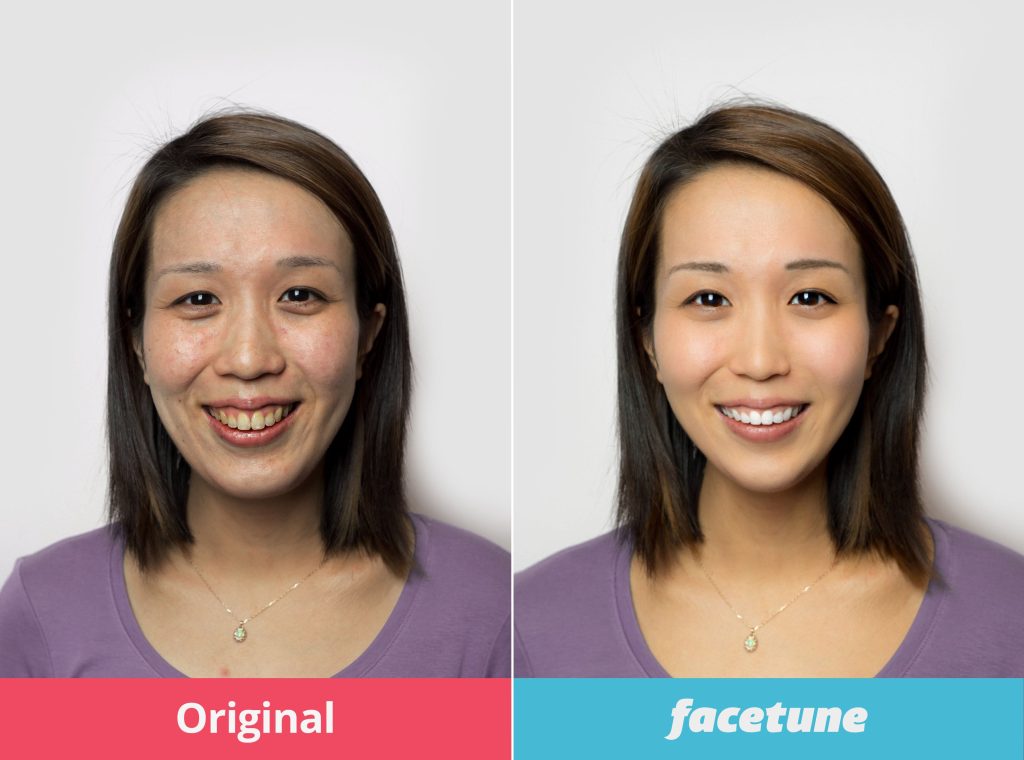
- Smile: You can emphasize your smile, enlarge or refine it, as well as give your teeth natural shine and whiteness.
- Skin: Softens and rejuvenates your skin, eliminating temporary imperfections such as pimples and blemishes, as well as brightening dark circles and improving the color tone of our skin.
- Eyes: You can emphasize your eyes for a more piercing look, change our eye color, and even remove the tricky “red eye” effect from photographs.
- Hair: We will be able to improve the tone of our hair, as well as add more and better hair volume.
- Facial structure: Refine your facial lines, raising your cheekbones and eyebrows, as well as transforming your face into that of an alien in a fun way, among other functions.
- Makeup: Apply any eye shadow, add volume to your lashes and eyebrows, as well as increase the intensity of our lip color.
- Photo enhancements: Focus, improve lighting, add effects, create filters and add frames are just some of the many possibilities of Facetune.
Is it really that good at editing our photos?
It is certainly a very interesting application. It's true that it may seem a little artificial and superficial to edit our photographs, but this is to everyone's liking, as Facetune will allow us to remove just one pimple or even retouch any deviation from our nose.
In short, the application received an average rating of 4.5 stars, both in the global version and in the most recent update, something to be taken into account in such a demanding application market.
Therefore, it is possible to conclude that the Facetune is really a very interesting application for anyone who wants to edit their Photos simply and easily.
Did you like to know more about the Facetune? So be sure to follow the other articles on the blog, I have lots of other news for you!
Before deciding, check these points.
- Where do your images go?. Tools that use cloud processing upload the photo. Read the policy before sending an image of a document or a child.
- It works without internet. Editors who process photos on their own device work offline. Those that rely on a server do not—and send your photo externally.
- Resolution of the exported file. Some reduce the image size when exporting without a signature. If the photo is for printing, this is a crucial factor.
- Watermark on the free version. This is the most common trick: the app lets you edit for free, but then stamps the logo on it when you save. Check this before investing your time.
What these apps don't do
Every category has a limit, and knowing this one's limit saves time and money by avoiding those who promise more than what's available.
- No app can see through clothes or walls. What exists is simulation — a generated image, not a captured image.
- Beauty filters alter the image; they don't alter the person. It's important to remember this when comparing the result to an unedited photo.
- They don't recover details that don't exist in the file. Increasing the resolution reconstructs pixels by estimation—it doesn't reveal lost information.
- Recovering deleted photos only works on images that haven't been overwritten yet, and the chances of success decrease with each use of the device.
Common questions
Is it possible to recover a deleted photo?
If there's a backup in Google Photos or iCloud, yes. Without a backup, only if the space hasn't been overwritten—and that chance drops quickly.
Does the photo lose quality when edited?
Each export recompresses the file. Edit once and save, instead of saving after each adjustment.
Is the premium version worth paying for?
It's worthwhile if you edit frequently and need high-resolution export or to remove the watermark. For occasional use, the free version is sufficient.
Is a free editor safe?
Check the permissions requested. A photo editor does not need access to contacts, messages, or microphone.
Will my photos go to the cloud?
It depends on the app. Those that do everything on the device work offline; those that use a server send the image externally.
How to truly take advantage of it.
- Work on a copy. Duplicate the image before editing. Good apps do this automatically, but double-checking prevents losing the original.
- Export at the highest quality available. If you're going to print, look for the high-resolution export option — some free versions reduce the resolution without warning.
- Adjust the light before applying the filter. Exposure, contrast, and shadows first; filter later. In reverse order, the filter amplifies the flaw.
- Save only once. Each export process recompresses the file. Make all the necessary adjustments and export at the end.
Common mistakes that are costly
- Increasing the resolution in the hope of revealing detail — the program estimates pixels, it doesn't retrieve information.
- Discovering the watermark only when exporting, after half an hour of editing.
- Granting access to all photos when the app only needs one.
- Send a photo of a document or a child to an editor who processes it in the cloud.
The alternative that is already included in the system
The phone's built-in gallery editor already handles cropping, light adjustment, object removal, and perspective correction in recent versions of Android and iPhone. For quick adjustments, it solves the problem without installing anything or sending the image externally.
How does the subscription model work in a photo app?
Mobile image editors have almost all migrated to a subscription model, and the commercial design is standardized. Understanding the standard avoids unexpected charges.
The typical format has three layers. A free version, with a subset of tools and a watermark on export. A trial period, usually three to seven days, which requires registration of a payment method right at the beginning. And automatic conversion to a subscription at the end of the trial, with recurring weekly, monthly, or annual billing.
Two points deserve attention:
- The option pre-selected on the purchase screen is usually the most expensive per unit of time. A weekly subscription seems cheap, but when added up over a year, it costs much more than an annual one.
- The conversion notification appears once. After that, the billing date is no longer visible within the app. It remains visible in the store.
A simple practice solves the problem: when starting any free trial, create a reminder in your calendar for the day before it ends. This habit is most effective at preventing unwanted charges from photo, video, and editing apps.
Cancel before billing, step by step.
Uninstalling the app doesn't cancel anything. The subscription is a contract with the store, not with the app, and it continues running even after the app is uninstalled.
On Android: Open the Play Store, tap your profile picture, go to Payments & subscriptions, then Subscriptions. Select the subscription and choose Cancel. You will still have access until the end of the paid period.
On iPhone: Open Settings, tap your name at the top, go to Subscriptions, select the app, and tap Cancel subscription. Access will continue until the end of the subscription period.
Two common pitfalls: signing up with a store account different from the one you use daily — in this case, the subscription won't appear in the list, and you'll need to switch accounts to find it; and signing up through the developer's website instead of the store, in which case cancellation is done directly on the website.
Request a refund
Both stores have a refund process. On Android, there's an automatic request in a short window after purchase, followed by a case-by-case review; on iPhone, the request is made on the purchase problem reporting page. Furthermore, the Consumer Protection Code guarantees the right to return purchases within seven days for purchases made outside of a physical store, which includes apps. Keep your receipt and make the request through official channels, never through third-party websites.
How much can be done without signing anything?
Much of the success people attribute to paid apps comes from basic adjustments, available for free in any editor and within the system itself:
- Framing and straightening the horizon. The adjustment that improves amateur photos the most, and it's always free.
- Exposure and contrast. An underexposed photo appears to be of poor quality even if it is sharp.
- Color temperature. Correcting the yellowing from the lamp changes the perception of skin more than any retouching.
- Separate shadows and highlights. Raising shadows brings out detail in a face against the light without blowing out the background.
- Spot correction of an imperfection. Several free editors have a blemish removal tool, sufficient for common use.
What's usually left behind in the signature is the advanced retouching: reshaping body and face contours, changing the sky, removing large objects with smart fill, exporting at maximum resolution, and removing watermarks. It's worth honestly asking yourself if your use requires all of that.
The line that separates retouching from distortion.
Body and face reshaping tools are the best-selling and most problematic. Here are some technical points to help avoid overdoing it:
- Deformation affects the background. Slimming the waistline distorts the door behind the person. A curved straight line is the easiest telltale sign in an edited photo.
- Making the eyes bigger changes the proportions of the entire face. The brain perceives the disproportion even without locating the cause.
- Smoothing skin destroys texture. If the hair has strands and the skin has no pores, the editing becomes obvious.
- Each JPEG export recompresses. Editing, saving, reopening, and editing again creates square blotches on smooth areas. Do it all in one session and save only once.
Beyond aesthetics, there are contexts in which editing creates concrete problems: photos of documents and registrations with biometric validation cannot be altered; advertisements for products or services that suggest results the product does not deliver constitute misleading advertising; and edited images of another person, published without authorization, infringe on image rights as stipulated in Article 20 of the Civil Code.
Signs that the app is a copy.
Popular editors attract clones, and these clones thrive on the confusion surrounding their names. Before installing, check this out:
- The developer's name, Compared to the official website, the icon and title are copied; the account that publishes it is not.
- Publication date and number of reviews. A newly released app with a perfect rating and generic reviews is a clear sign.
- Permissions requested. A photo editor needs access to images and, if capture enabled, to the camera. They don't need contacts, SMS, calls, or precise location.
- Installation outside of the official store. Separate installation files for paid applications, distributed as "unlocked" versions, are one of the most common vectors for malware on Android.
- Aggressive advertising. Full-screen ads that appear on every tap and redirection to the browser indicate that this app is designed solely to monetize traffic.
It's also worth periodically reviewing the list of active subscriptions in the store. Editing apps installed out of curiosity, used twice and forgotten, are the most common source of recurring charges that no one can explain on the bill.