Satellite internet applications: how to download and use Starlink, HughesNet, and Viasat.
 Put Rodrigo Pereira
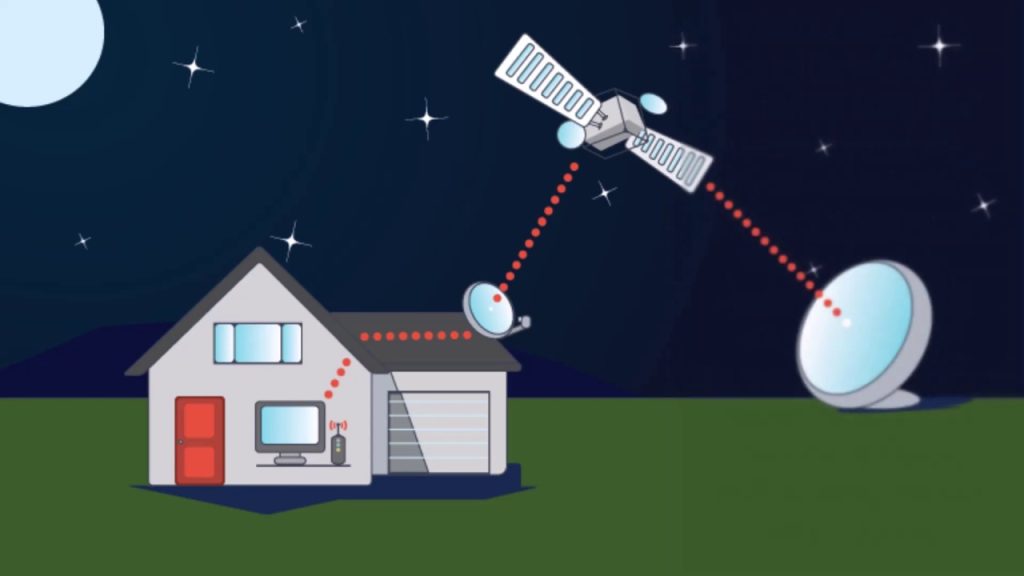
Satellite internet applications exist, are easy to download, and are really helpful — but you need to understand what they are before installing them: They don't provide a connection.. A Starlink, HughesNet, or Viasat app is the control panel for a contracted service. It shows usage, signal status, helps choose the best location for the antenna, and opens support tickets. The internet itself comes from the terminal installed at your address and the monthly fee you pay to the provider.
With that honest caveat, this guide shows how to download and use Each of these applications is explained, along with what you need before installing them, the actual cost structure of each service in Brazil, and which alternatives are usually cheaper for those who just want to solve a weak signal problem. We've also included a section on scams related to satellite kits, because they are becoming increasingly common.
What does a satellite internet application really do?
It's worth detailing the functions, because they are truly useful for those who subscribe to the service:
- Check for obstructions. Some apps use the camera to scan the sky and show where there are trees, roofs, or poles blocking the view. This feature is the most trouble-free option during installation.
- Monitor consumption. Almost all satellite plans have a data allowance for priority speeds. The app shows how much you've already used in the billing cycle.
- View status and errors. Outages due to rain, provider maintenance, or cable problems appear in the diagnosis.
- Manage your account. Duplicate invoice, plan change, registration details, and opening a technical support ticket.
- Set up the Wi-Fi. Network name, password, guest network, and remote router restart.
None of them do anything: provide internet access without a subscription, work without an antenna, or turn your cell phone into a satellite receiver.
What you need to have before downloading the app.
Before downloading anything, make sure the scenario matches:
- Coverage at your address. All providers check the postal code before selling. Satellite coverage is not automatic: it depends on available capacity in your cell.
- Clear view of the sky. The antenna needs to have an unobstructed view of the satellite. Tall vegetation, neighboring roofs, and water tanks can cause problems.
- Installation location. Rooftop, mast, or open area with cable run to the router.
- Stable electrical power. The terminal consumes power continuously; in rural areas with frequent power outages, an uninterruptible power supply (UPS) is helpful.
- Budget for the equipment and the monthly fee. Both costs exist and are separate.
Starlink: How to download and use it
SpaceX's Starlink operates with satellites in low Earth orbit, which significantly reduces latency compared to traditional satellites. The app is the essential companion to the kit: it guides you through the installation step-by-step and measures the line-of-sight quality.
How to download: for the Google Play on Android or by App Store on iPhone. The download is free.
How to use it even if you're not yet a subscriber: Even before you buy, the app has a "check for obstructions" tool that uses the camera to simulate the line of sight to the sky at the point where you intend to install the antenna. It's a good feasibility test before spending money.
How to use after subscribing: Connect your phone to the Starlink router's Wi-Fi network and log in with your account. From there, you can monitor real-time speed, drop history, cycle consumption, terminal temperature, and network settings. You can also change plans and pause the service directly through the app, according to the current rules.
Cost: There is a kit cost (antenna, base, and router) plus a monthly fee. Residential, mobile, and business plans have different prices, and the company occasionally offers equipment promotions. Check the current price for your address at [website/link]. Official Starlink website in Brazil We avoid publishing numbers here precisely because they change frequently.
HughesNet: How to download and use
HughesNet is one of the oldest satellite internet services in operation and has been serving rural areas of Brazil for years, using a geostationary satellite. Latency is higher than Starlink, which can be a drawback for online gaming and video calls, but coverage is extensive and installation is performed by a certified technician.
How to download: The Brazilian subscriber app is on Google Play, as “Hughesnet – Subscriber Area”. If you use an iPhone, you can access the subscriber area through your browser on the official website.
How to use: Log in using your CPF (Brazilian tax identification number) or contract number. The app shows your data usage for the cycle, allows you to issue a duplicate bill, purchase additional data, check the technical status of your connection, and open a support ticket. There is no "free" mode: access to the app requires an active contract.
Cost: Equipment (purchased or leased, depending on the offer), installation, and monthly fee according to the chosen data package. Plans usually have a high-speed data allowance, with speed reduction after the limit is reached. Check the current conditions at [website/link]. official website of HughesNet Brazil.
Viasat: how the subscription works
Viasat also operates satellite internet in Brazil, focusing on homes outside fiber optic areas and on corporate and community solutions. The practical difference for the end user is that we couldn't find a Viasat subscriber app in the Brazilian Android store—signup, plan tracking, and support are handled through the app. Viasat's official website in Brazil. or through the customer service channels specified in the contract.
If you find a "Viasat app" outside of Google Play or the App Store, do not install it. Apps distributed as loose files, via message links, or on third-party websites are a known vector for fraud, even when they use the correct brand and logo.
Sky Muster and Globalstar Sat-Fi2: why they probably aren't right for you.
These two names appear on many lists of "satellite internet apps," so it's worth clarifying.
O Sky Muster It's Australia's national broadband satellite service, designed to serve Australian rural properties. It doesn't serve addresses in Brazil—downloading the app here offers no benefit whatsoever.
O Globalstar Sat-Fi2 It's a different kind of product: a portable satellite hotspot, sold as a device, that creates a local Wi-Fi network for sending messages, short emails, and emergency calls via satellite. The speed is very low compared to broadband—it's suitable for essential communication on expeditions, ships, or in field operations, not for browsing, watching videos, or working. The app exists, but it depends on the device and a contracted messaging plan.
Step by step: from hiring to the first connection
For those who have never subscribed to satellite service, the complete process is usually this, regardless of the provider chosen:
- Check availability. You enter your zip code on the official website and the system responds whether there is capacity for your address.
- Choosing a plan. Compare data allowance, contracted speed, commitment period, and speed reduction policy after the limit is reached.
- Hiring and paying for the kit. Always use the provider's official channels or an authorized reseller with an invoice.
- Delivery or scheduling. Some services send the kit for self-installation; others send a certified technician.
- Choosing the installation point. Here the app really helps, with the camera obstruction test.
- Antenna mounting and alignment. Modern terminals orient themselves; traditional satellite dishes require manual alignment.
- Connecting the router and creating the Wi-Fi network. Set a strong username and password the first time you log in.
- Log in to the app and test it. Check the speed, latency, and whether the diagnosis indicates any residual obstruction.
If the measured speed is significantly lower than what you contracted for on the very first day, record the test and open a support ticket through the app. Providers usually offer a free adjustment or reinstallation period in the first few days, and the record in the app serves as a record of the service request.
How to install the app safely
- Download only from Google Play or in App Store. Check if the address is correct. play.google.com or apps.apple.com, without variations.
- Check the developer's name on the app's page. Clones often have similar names and unknown developers.
- Check the number of downloads and recent ratings. The official carrier app has a history.
- Deny permissions that don't make sense: a plan management app doesn't need contacts, SMS, or accessibility.
- Enable two-step verification on your provider account, when available.
- Never give your card details to someone who calls claiming to be from support. Call the official channel yourself.
Scams involving kits and satellite internet plans
Since the subject involves expensive equipment and many people lacking technical knowledge, fraud is frequent. The most common patterns are:
- "Display model" or "defective" kit for a fraction of the price., announced on social media, with payment via PIX for individuals.
- Fake authorized reseller that charges a scheduling fee for installation. Legitimate providers charge for the contract, not for an upfront payment into a personal account.
- App not available in the store. Promising to unlock the device, remove data caps, or use the service without a subscription. Besides not working, it exposes your data.
- “"Free satellite internet for the community"” Registration is required. Public connectivity programs do not charge citizens.
- Fake support call requesting data confirmation or installation of a remote access app.
Cheaper alternatives before switching to satellite
Satellite solves the extreme case: no fiber, no radio, and no usable cell phone signal. If your scenario is less severe, test these options first:
- Regional radio-based internet service provider. Common in rural areas, it usually costs much less than satellite TV.
- 4G/5G router with external antenna. Where there is a weak cell phone signal, a directional antenna pointed at the tower transforms a single bar into a stable connection.
- Improve the network you already have. Many people think they need to switch providers when the problem is internal distribution. It's worth reading our guide on this topic. How to increase the Wi-Fi range in your home..
- Public Wi-Fi for occasional use. For those who only need occasional access, it's worth knowing about... apps that find free Wi-Fi.
Common questions
Baixar o app dá internet de graça?
No. The app is free, but it only manages a paid service. Without an installed antenna and an active contract, it won't connect anything.
Dá para usar o satélite direto no celular, sem antena?
For broadband, no. Some recent devices have satellite messaging or emergency features, with availability varying by model, carrier, and country, and these are only for text.
Internet via satélite funciona com chuva?
Heavy rain can temporarily degrade the signal, especially with geostationary satellites. This is a characteristic of the technology, not a defect in the installation.
Serve para jogar online?
Low Earth orbit (Starlink) has much lower latency and allows for gaming and video calls in most cases. Geostationary satellites have high latency and are poorly suited for competitive gaming.
Conclusion
Downloading and using a satellite internet app is simple: you find it on Google Play or the App Store, install it in seconds, and log in with your provider account. The point that almost no content clearly explains is what comes before—the installed antenna, the clear line of sight, and the monthly subscription. This combination delivers the connection; the app only provides visibility and control over it.
If you live in an area without fiber optic and decent signal, compare Starlink, HughesNet, and Viasat by address, check the total cost (equipment plus monthly fee), and evaluate whether a regional provider or a 4G router with an external antenna would be cheaper. And, in any scenario, only install apps from official app stores and be wary of any kit or plan offer that asks for payment outside of the company's official channels.