
If the idea is to go out with your cell phone in hand looking for gold, it's best to adjust your expectations right away: no app detects gold. The only sensor on the smartphone capable of reacting to metal is the magnetometer—the compass—and it only detects ferrous metals, such as iron and steel, at a distance of a few centimeters. Gold, silver, copper, aluminum, and bronze are also detectable. They are not ferromagnetic. They simply don't alter the reading. The developer of the world's most downloaded metal detector app himself states this in the app's description.
There is also no "geolocation algorithm" that can pinpoint where there is gold in the ground: real prospecting depends on geology, sample analysis, and field equipment. With that point clarified, the subject becomes much more interesting, because the cell phone... he has Legitimate and useful applications in amateur prospecting and detection — but also others. This guide shows what a magnetometer actually finds, what real applications exist, what a real metal detector does, and how your cell phone becomes a valuable support tool in the field.
How the cell phone sensor works (and why it ignores gold)
The magnetometer was placed in the device for a simple task: to point north. It measures the intensity of the surrounding magnetic field, typically around 49 microtesla in an open environment. When a piece of iron or steel approaches, this value increases, and the applications convert the variation into a number, graph, or beep.
It's a principle passiveA cell phone only listens to the existing field of vision. A real metal detector does the opposite—it is... active. The coil emits an electromagnetic field, this field induces currents in the buried metal, and the device picks up the echo of these currents. Because the process depends on electrical conductivity, and not magnetism, the detector finds gold, silver, copper, and coins without difficulty.
This difference explains everything. The cell phone doesn't emit anything, so it only perceives what already disturbs the magnetic field: iron and steel, very close by. A gold ring two centimeters from the screen produces no reaction whatsoever.
What does a cell phone magnetometer really find?
- Iron and steel objects within a few centimeters: nails, screws, hinges, keys, tools.
- Metal drywall profiles and steel conduits inside walls.
- Shallow metal lids and boxes.
- Rebar close to the surface in concrete.
- Magnets and speakers hidden in objects.
What he will never find
- Gold, silver, copper, aluminum, brass, and bronze — non-ferrous metals.
- Anything buried more than a few centimeters deep.
- Nuggets, veins or mineral deposits in the soil.
- Objects submerged in water, wet sand, or a thick layer of soil.
Real apps and what they're used for
These apps are available in official app stores and are honest about their limitations. None of them strike gold — and that's precisely why they're worth installing: they deliver what they promise.
1. Metal Detector (Smart Tools)
It's the most popular app in its category, with tens of millions of downloads, and the most transparent of them all. It displays the reading in microtesla, has a configurable alarm by level, and an optional sound effect. The official description states that the application... It does not detect gold, silver, or copper coins., Because they are non-ferrous metals, it warns that televisions, computers, and microwaves interfere with the measurement. Use it to find nails in wood, drywall profiles, and shallow iron objects. Available at Google Play.
2. Smart Tools
A utility kit from the same developer, including a metal detector, ruler, protractor, bubble level, angle distance and height meter, compass, and flashlight. In the field, the compass and level end up being used more than the detector itself—which sums up the role of the cell phone in this activity. Available on... Google Play.
3. Minelab GO-FIND
This is the companion app for the GO-FIND line of physical metal detectors from Minelab. It It doesn't detect anything on its own.It needs to be paired via Bluetooth with the brand's device. Once connected, the cell phone becomes a control panel and map, showing sensitivity adjustments, metal discrimination, and recording the points where each finding occurred. Available on Google Play.
It's a good example of what cell phones do well in this hobby: interface, recording, and organization — while the detection work is left to the device.
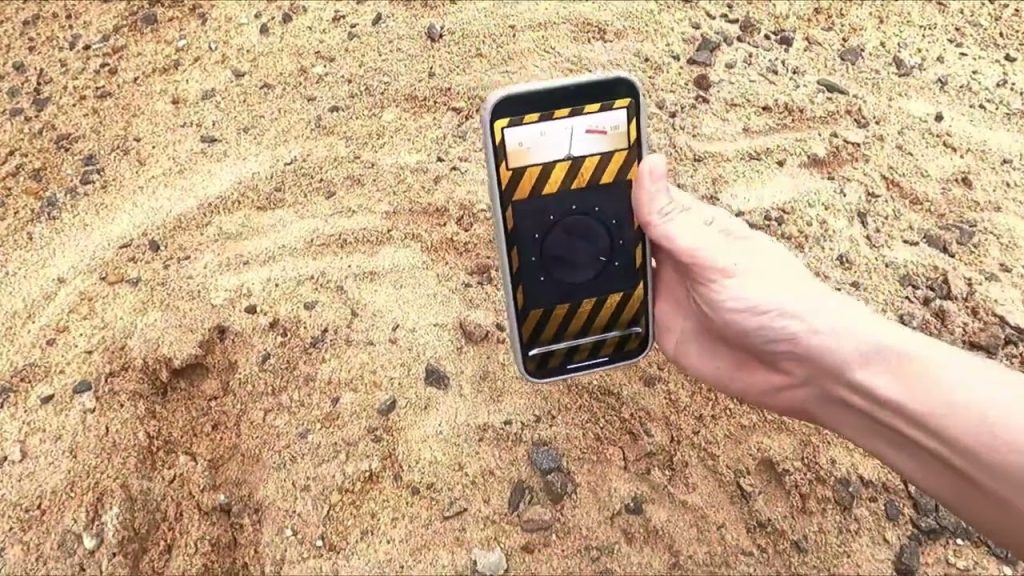
How to test your cell phone sensor in five minutes.
It's worth doing this test before going out into the field — it shows the device's real range in practice and avoids frustration.
- Remove the phone case, especially if it has a magnetic clasp or backing.
- Open the app and calibrate the compass by moving your phone in a figure-eight pattern in the air.
- In the middle of the room, away from appliances, write down the reference value.
- Bring a steel wrench close: the reading should rise significantly within a few centimeters.
- Now bring a gold ring or a copper coin close to it. Nothing happens — and that confirms the sensor's limitations.
- Finally, move the key away until the signal disappears. The distance you measured is, in practice, the useful range of your device.
What does a real metal detector do?
Anyone truly interested in the hobby will need equipment. It's worth learning the vocabulary before buying.
VLF (very low frequency) detectors These are the most common and accessible. They emit a continuous field and are able to... discriminate Materials, that is, to indicate whether the target is likely iron, aluminum, silver, or gold, based on conductivity. It's the right category for beaches, parks, rural areas, and searching for lost coins and jewelry.
Pulse (PI) detectors They emit short pulses and are much better in mineralized soil and wet beach sand, at greater depths. They discriminate less, so you unearth more metallic debris along with them.
Larger coils They reach deeper and cover more area, but lose sensitivity for small targets; smaller coils do the opposite.
Add to that the basic accessories: headphones (discrimination is much better perceived through sound), pinpointer — a handheld detector that locates the target inside the hole —, a narrow shovel, gloves, and a container for whatever is found.
Where the search usually yields the most results.
Choosing the right location is more important than the price of the equipment. Those starting out in the hobby tend to perform better in these scenarios:
- Dry sand strip of busy beaches, Especially after busy weekends: that's when chains, earrings, and coins slip along with the sunscreen.
- Parks and picnic areas, especially near benches, sports courts, and shady trees, where people sit and take items out of their pockets.
- Land with old houses, With the owner's permission, backyards that have been in use for decades hold coins and small utensils.
- Field edges and trails of old use., where there was a constant flow of people.
In scanning, the secret is rhythm: pass the reel close to the ground, slowly, in parallel strips that slightly overlap. A short, high-pitched signal usually indicates a small, shallow target; a low, wide signal indicates a large or deep target; an unstable signal that changes with each pass is usually metallic debris or rusty iron. Learning to read these sounds is what separates those who find things from those who only dig holes.
Where does a cell phone really help in field searches?
With the role of the telephone replaced by that of support, it becomes quite useful:
- Coordinate log. Marking the exact location of each find on the map reveals patterns and helps to return to the correct spot.
- Maps and satellite images. They are useful for planning the area before leaving home and identifying publicly accessible land. It's worth remembering that satellite images in apps are archived, not real-time.
- Compass and level. They help keep the scan organized in parallel lanes, which greatly increases the rate of findings.
- Photograph of the find at the scene. Registering before removing is good practice, and mandatory if there is any suspicion of historical value.
- Notes and field diary. Soil type, depth, climate, and detector configuration — information that improves the results of the next field trip.
- Flashlight and emergency contact information. Obvious, but essential in rural areas.
Rules and precautions before you start looking.
Metal detecting is a legitimate hobby, but it has clear legal limits in Brazil, and ignoring them can lead to serious problems.
- Private land requires permission from the owner. Without that, it's an invasion.
- Archaeological sites and properties of historical value are protected by law. Digging in these locations is a crime. If something appears that seems old or of cultural value, the correct course of action is to stop and notify the heritage authority.
- Environmental protection areas, conservation units, and beaches with municipal regulations. They may prohibit excavation. Confirm beforehand.
- Gold mining is a regulated activity. Mineral extraction requires authorization from the competent authority; it is not something that can be done on your own with a hobby detector.
- Lost item belonging to a third party has an owner. Ideally, a piece of jewelry found on the beach should be returned, and there are proper channels for doing so.
- Repair the hole. This is what keeps the hobby well-regarded and the locations open.
Common questions
Is there an app that can detect gold using a cell phone? No. Gold is not ferromagnetic and does not alter the field detected by the magnetometer. No application, free or paid, can circumvent this physical limitation.
And what about apps that show "golden points" on the map? These are either entertainment or simulations. There is no public database that indicates gold in the ground through geolocation; finding the mineral requires geological surveys and sample analysis.
Does the cell phone detector work underground? Practically not. The useful range is only a few centimeters, and even then only for iron and steel. It doesn't even cover a hand's width of dry ground.
Why does my app beep when I'm near my computer? Because electronic devices generate a magnetic field. Microwaves, TVs, routers, speakers, and even cell phone cases can alter the reading.
My phone doesn't have a magnetometer. Is it possible to install one via an app? No. If the sensor doesn't exist in the hardware, no app can create it. Several entry-level models don't have a compass—the app might even open, but it won't measure anything.
What is the cost of entry into a real detector? Entry-level VLF models are already sufficient for the beach and park, and it's possible to start with a simple device paired with a pinpointer. It's more worthwhile to learn how to interpret the signals than to spend a lot on the first piece of equipment.
Can a metal detector find gold dust or small nuggets? It depends. Very small nuggets require specific high-frequency detectors for gold; gold powder is not detectable by these devices. It's a different level of equipment and technique.
Conclusion
The promise of turning your cell phone into a gold detector doesn't hold up, and the explanation is straightforward: the phone has a passive sensor that only reacts to ferrous metal within a few centimeters, while gold, silver, and copper are non-ferromagnetic. No algorithm, update, or paid version changes the physics of the sensor.
What is truly useful is well-defined. Apps like Metal Detector and Smart Tools are helpful for finding shallow iron and assisting with small jobs around the house; the Minelab app shows the best role of the cell phone in the hobby, which is to act as a panel and map for a physical detector. And, in the field, the phone shines in its support—coordinates, maps, compass, recording, and photos. The equipment is what actually detects. With this clear division, the hobby becomes much more productive and less frustrating.



