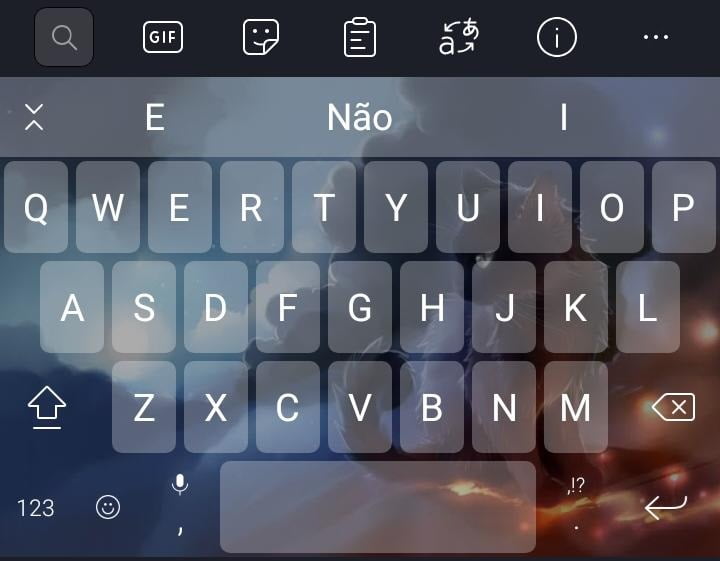
Applications for placing background images on your cell phone keyboard are a great way to personalize your mobile device.
They allow you to change the default keyboard background with an image of your choice, be it your photo or an image found on the internet.
Additionally, many of these apps also offer additional features such as custom themes, emoticons, and other customization options.
Before installing, check the permissions. Any keyboard from a third-party company requires "full access" permission to function, and the system itself warns that it can read what you type, including passwords, card numbers, and messages. This doesn't mean that the apps below misuse this, but it's worth following three simple precautions: read the privacy policy before accepting, prefer keyboards that allow you to disable full access or use offline mode, and switch back to your phone's default keyboard when entering banking information. Also, check the permissions requested in the app store—a keyboard doesn't need contacts, a microphone, or location to change the background image.
The first app to mention is “Keyboard – Emoji, Emoticons“. This app is free and offers a variety of custom themes, including background images.
It also offers additional features such as multiple language support and emoji support.
Furthermore, it is compatible with many different devices, including smartphones and tablets — however, the appearance of the themes changes depending on the brand and version of Android installed on the device.
Another popular app is “GO Keyboard“. It also offers a variety of custom themes, including background images.
It also includes features like support for multiple languages, emoticons, and additional customization options.
It is compatible with many different devices and is free to download.
O "Kika Keyboard” is another popular app for customizing your cell phone keyboard. It includes a variety of custom themes, including background images, as well as features like support for multiple languages and emojis.
It also offers an additional customization option, such as the ability to change the color and size of keyboard characters.
It is free to download and compatible with many different devices.
O "Chrooma Keyboard” is another popular app for customizing your cell phone keyboard. It includes a variety of custom themes, including background images, as well as features like support for multiple languages and emojis.
It also offers an additional customization option, such as the ability to change the keyboard color according to the current application. It is free to download and compatible with many different devices.
Finally, the “Fleksy Keyboard” is another popular app for customizing your cell phone keyboard. It includes a variety of custom themes, including background images, as well as features like support for multiple languages and emojis.
It also offers an additional customization option, such as the ability to change the size and shape of keyboard characters. Furthermore, it has an advanced autocorrect function and supports gestures for fast typing.
It is free to download and compatible with many different devices.
In addition to these apps, there are many others available in your device's app store, such as “KeyboardPlus“, “Smart Keyboard Pro" It is "Typewise Keyboard“".
It's important to remember to read the reviews, permissions requested, and descriptions of apps before downloading them, to ensure they meet your needs and are compatible with your device.
In conclusion, apps for putting background images on your cell phone keyboard are a great way to personalize your mobile device and make it more attractive.
They offer a variety of custom themes, including background images, as well as additional features like support for multiple languages, emoticons, and additional customization options.
When choosing an app, it's important to read reviews and descriptions to ensure it meets your needs and is compatible with your device — and, most importantly, to review the permissions granted, since the keyboard sees everything you type.
What to look for before installing
- App weight. Full-featured editors can exceed 300 MB. On devices with limited storage, a lightweight app will handle the basics without crashing.
- Preserve the original. Good editors save a copy. Be wary of any app that overwrites the file directly.
- Where do your images go?. Tools that use cloud processing upload the photo. Read the policy before sending an image of a document or a child.
- It works without internet. Editors who process photos on their own device work offline. Those that rely on a server do not—and send your photo externally.
What these apps don't do
Before installing, it's worth managing your expectations: there are things that no app in this category delivers.
- Recovering deleted photos only works on images that haven't been overwritten yet, and the chances of success decrease with each use of the device.
- No app can see through clothes or walls. What exists is simulation — a generated image, not a captured image.
- They don't recover details that don't exist in the file. Increasing the resolution reconstructs pixels by estimation—it doesn't reveal lost information.
- They don't remove watermarks from third-party photos. Besides not working properly, using the image without a license is a copyright violation.
Common questions
Is it possible to recover a deleted photo?
If there's a backup in Google Photos or iCloud, yes. Without a backup, only if the space hasn't been overwritten—and that chance drops quickly.
Is a free editor safe?
Check the permissions requested. A photo editor does not need access to contacts, messages, or microphone.
Which format should I save it in?
JPEG for general use, PNG when there is transparency or text, and the original format when archiving.
Is the premium version worth paying for?
It's worthwhile if you edit frequently and need high-resolution export or to remove the watermark. For occasional use, the free version is sufficient.
Can I edit without a watermark for free?
Yes, in several applications, but with limited features. Check beforehand by saving a test image.
Step-by-step to get started
- Restart before concluding that it's slow. Much of the slowness disappears with a restart, without needing any application.
- See what takes up space before installing a cleaner. In Settings › Storage, the system itself shows the breakdown by type. Almost always the culprits are video and social media cache.
- Clear the cache of larger applications. You can do it app by app in the settings, without installing anything, and without losing your login or settings.
- Uninstall anything that hasn't opened in months. The list by usage time is in the settings. It's the most lasting way to save space.
Traps that catch almost everyone
- Deleting an application folder through the file manager can result in lost data that cannot be recovered.
- Trusting an app that promises functionality without having the corresponding sensor on the device.
- Install three utilities that do the same thing, all running in the background.
- Installing a cleaner that promises to speed up your phone — Android already manages memory on its own, and the gains don't last.
Before installing: what's already on the device
Android and iPhone already include features like a flashlight, voice recorder, document scanning, QR code reader, ruler, compass, level, and screen recording. Before installing, it's worth checking the settings – many people install what they already have.